> ## Documentation Index
> Fetch the complete documentation index at: https://docs.tight.com/llms.txt
> Use this file to discover all available pages before exploring further.
# Income Dashboard
> The fully-featured experience for viewing and managing income
## Overview
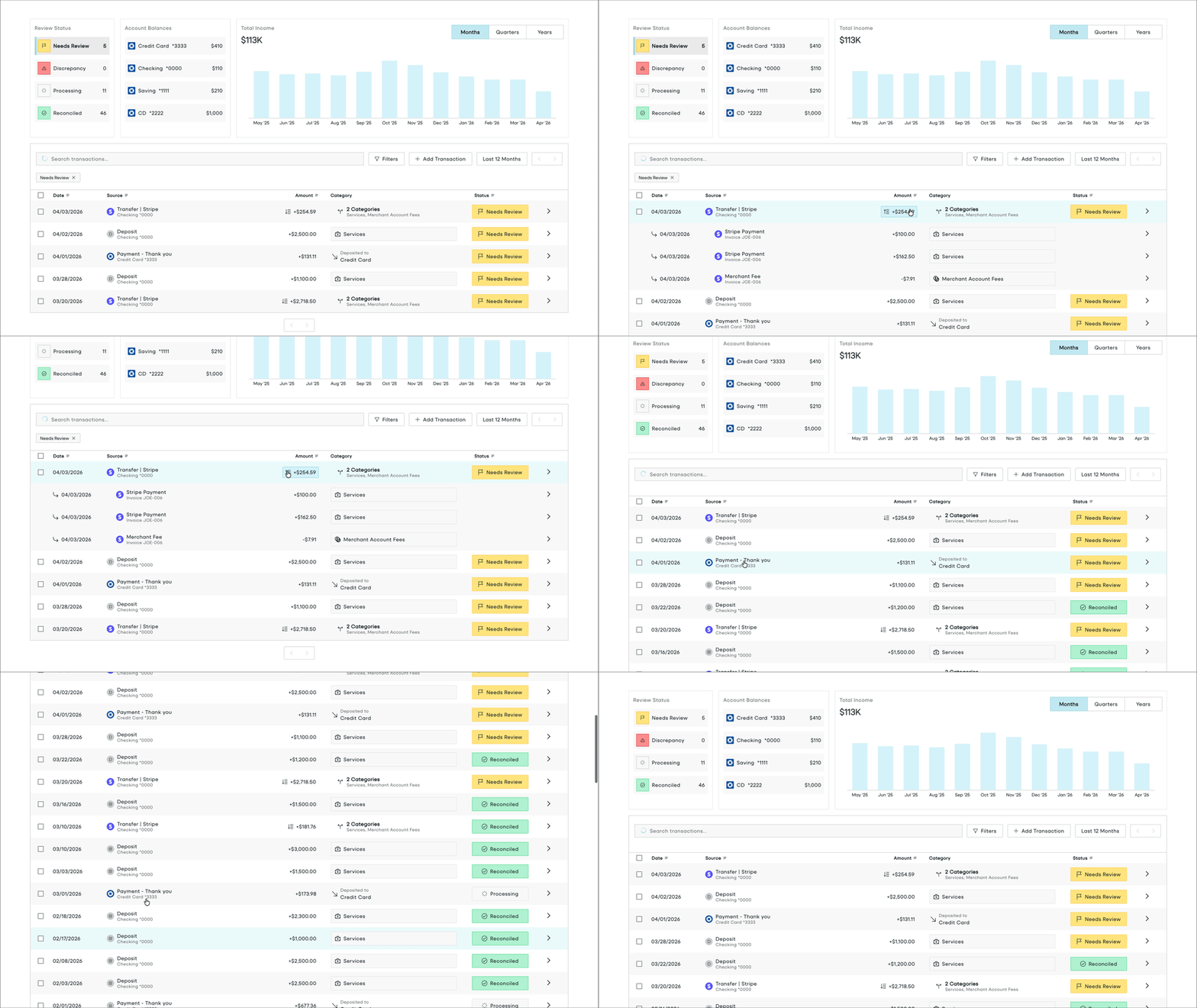
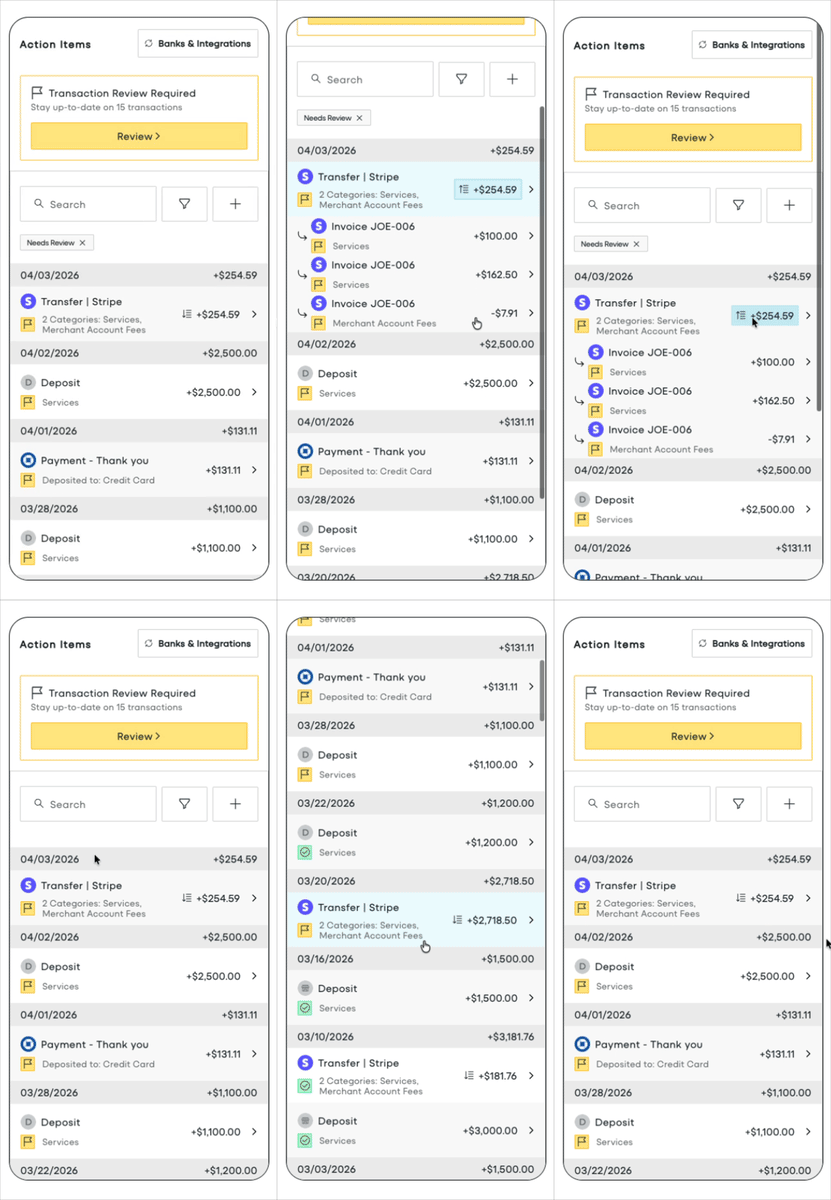
The Income Dashboard is all you need to provide full insight into business income to your users, allowing your users to:
* Link bank accounts and credit cards
* See how Tight AI categorized transactions
* Review any transactions that Tight AI could not confidently categorize
* Drill into payouts, to understand which invoices, merchant fees, and other line items comprise a payout
* Visualize income over time
* View/filter/search for income
 ## Embedding the Transactions Dashboard
To initialize the Tight Embedded experience in your React project, follow the instructions on [Embedding Tight's white-labeled UI](/embeddable-ui/react/patterns/embedding).
Below is an example embedding of the Income Dashboard:
```TSX IncomeDashboard.tsx theme={null}
import { IncomeDashboard, Tight } from "@tight-embedded/react";
import "@tight-embedded/react/index.css";
function IncomeDash({ accessToken }) {
return (
)
}
```
## Props
"} post={["optional"]}>
An ordered array describing which table columns to display on the dashboard. Duplicate entries will
be ignored.
A column is an object with two fields, `column` and `width`.
`column` is the name of the column. `width` is the desired pixel width of the column, and is optional.
Available options: `date`, `description`, `amount`, `category`, `reviewStatus`, `dimensionValue`
The set of filters to apply to the dashboard.
Passing in a value for this prop turns this into a controlled component. As such, you must also pass the
`onChangeFilters` prop to adjust the filters for user input.
Category filter
Id filter - returns all incomes in the given categories.
List of values to include.
Dimension value filter
Id filter - returns all incomes belonging to the given dimension values.
List of values to include.
Value - returns all incomes on the given date.
Value - returns all incomes not on the given date.
Value - returns all incomes after the given date.
Value - returns all incomes on or after the given date.
Value - returns all incomes before the given date.
Value - returns all incomes on or before the given date.
Review status filter
List of values to include.
Available options: `RECONCILIATION_DISCREPANCY`, `USER_REVIEW_REQUIRED`, `ACCOUNTANT_REVIEW_REQUIRED`,
`PARTNER_REVIEW_REQUIRED`, `AWAITING_MATCH`, `STAGED`, `RECONCILED`
List of values to exclude.
Available options: `RECONCILIATION_DISCREPANCY`,
`USER_REVIEW_REQUIRED`,
`ACCOUNTANT_REVIEW_REQUIRED`,
`PARTNER_REVIEW_REQUIRED`,
`AWAITING_MATCH`,
`STAGED`,
`RECONCILED`
A function that is called whenever the user changes the filters from the dashboard.
This function will only be invoked if the `filters` prop is also provided. The callback takes `filters` as its single
argument.
The number of transactions to show on a single page of the Transactions Dashboard.
## Embedding the Transactions Dashboard
To initialize the Tight Embedded experience in your React project, follow the instructions on [Embedding Tight's white-labeled UI](/embeddable-ui/react/patterns/embedding).
Below is an example embedding of the Income Dashboard:
```TSX IncomeDashboard.tsx theme={null}
import { IncomeDashboard, Tight } from "@tight-embedded/react";
import "@tight-embedded/react/index.css";
function IncomeDash({ accessToken }) {
return (
)
}
```
## Props
"} post={["optional"]}>
An ordered array describing which table columns to display on the dashboard. Duplicate entries will
be ignored.
A column is an object with two fields, `column` and `width`.
`column` is the name of the column. `width` is the desired pixel width of the column, and is optional.
Available options: `date`, `description`, `amount`, `category`, `reviewStatus`, `dimensionValue`
The set of filters to apply to the dashboard.
Passing in a value for this prop turns this into a controlled component. As such, you must also pass the
`onChangeFilters` prop to adjust the filters for user input.
Category filter
Id filter - returns all incomes in the given categories.
List of values to include.
Dimension value filter
Id filter - returns all incomes belonging to the given dimension values.
List of values to include.
Value - returns all incomes on the given date.
Value - returns all incomes not on the given date.
Value - returns all incomes after the given date.
Value - returns all incomes on or after the given date.
Value - returns all incomes before the given date.
Value - returns all incomes on or before the given date.
Review status filter
List of values to include.
Available options: `RECONCILIATION_DISCREPANCY`, `USER_REVIEW_REQUIRED`, `ACCOUNTANT_REVIEW_REQUIRED`,
`PARTNER_REVIEW_REQUIRED`, `AWAITING_MATCH`, `STAGED`, `RECONCILED`
List of values to exclude.
Available options: `RECONCILIATION_DISCREPANCY`,
`USER_REVIEW_REQUIRED`,
`ACCOUNTANT_REVIEW_REQUIRED`,
`PARTNER_REVIEW_REQUIRED`,
`AWAITING_MATCH`,
`STAGED`,
`RECONCILED`
A function that is called whenever the user changes the filters from the dashboard.
This function will only be invoked if the `filters` prop is also provided. The callback takes `filters` as its single
argument.
The number of transactions to show on a single page of the Transactions Dashboard.