> ## Documentation Index
> Fetch the complete documentation index at: https://docs.tight.com/llms.txt
> Use this file to discover all available pages before exploring further.
# Banks & Integrations
> All-in-one management page for connecting a user’s financial accounts
## Overview
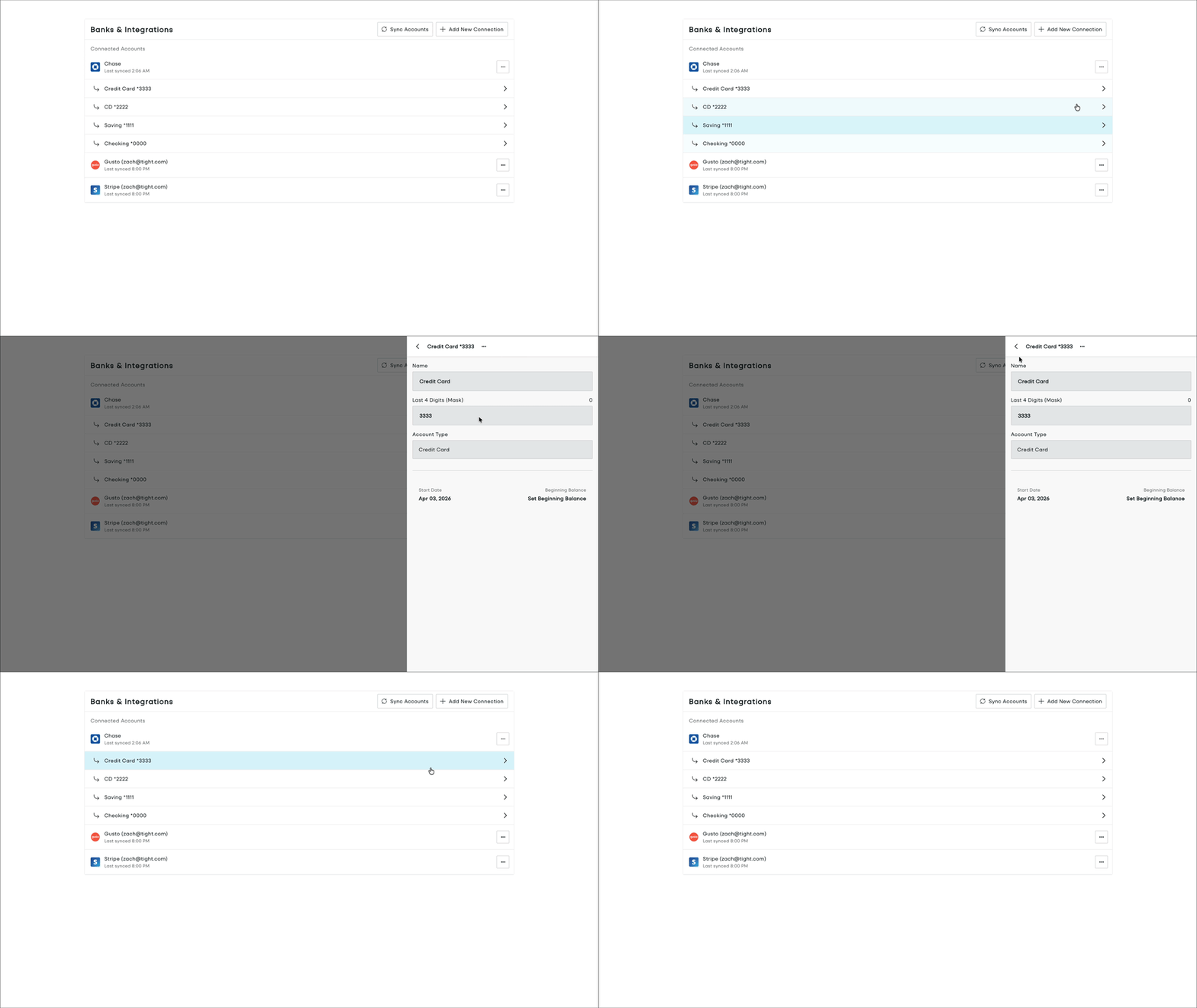
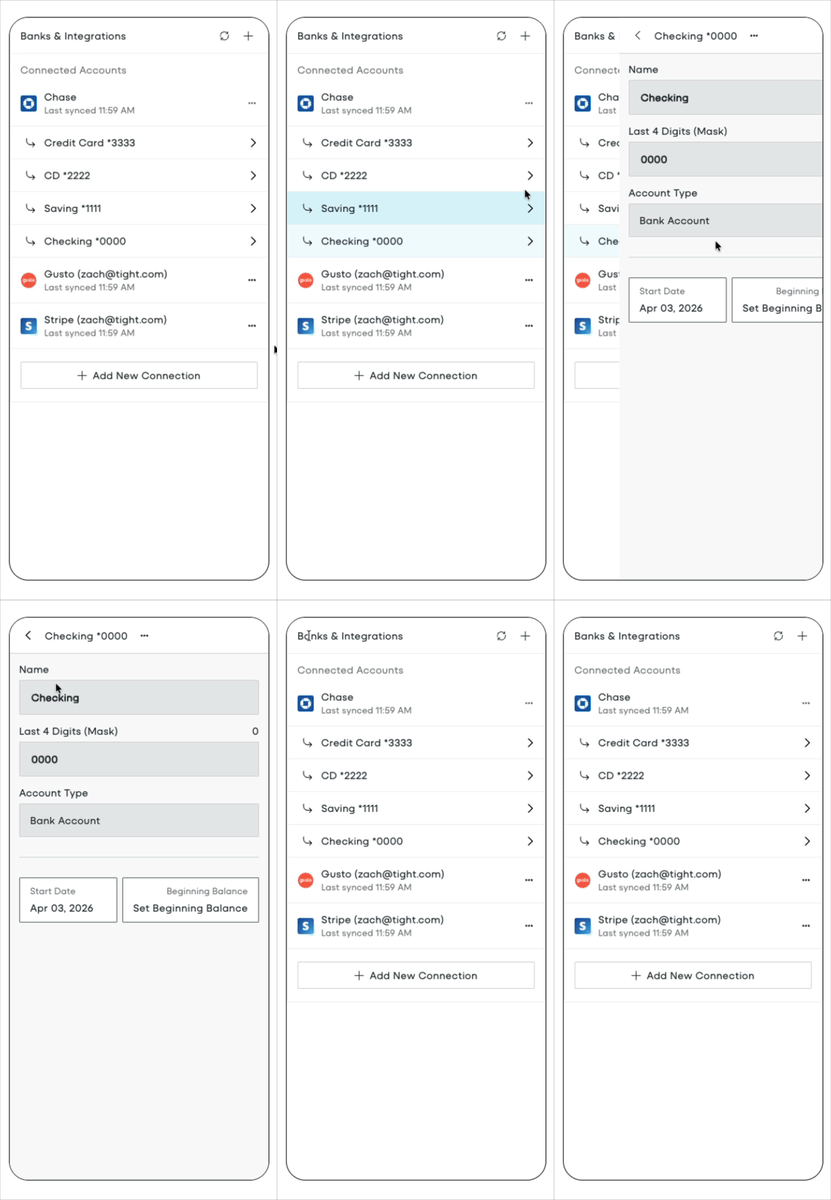
The Banks & Integrations page gives users an intuitive way to manage all of their connected financial accounts and integrations, including:
* Linking bank accounts through Plaid
* Connecting other financial accounts via Tight's native integrations (e.g. Gusto, Shopify, Stripe)
* Creating and maintaining manual accounts
* Setting start dates and beginning balances
* Addressing connection or credential issues
 ## Embedding Banks & Integrations
To initialize the Tight Embedded experience in your React project, follow the instructions on [Embedding Tight's white-labeled UI](/embeddable-ui/react/patterns/embedding).
Below is an example embedding of the Banks & Integrations page:
```TSX HomeDashboard.tsx theme={null}
import { BanksAndIntegrations, Tight } from "@tight-embedded/react";
import "@tight-embedded/react/index.css";
function HomeDashboard({ accessToken }) {
return (
)
}
```
## Props
A callback function that is fired whenever a user attempts to open Plaid from the Banks & Integrations page (for
example, when adding a new bank or resolving a connection issue).
You should use this if and only if your application *already* includes Plaid Link, that way you can intercept any user
action in Tight's Embedded UI that would invoke Plaid Link, so that *your* application can render Plaid Link.
Alternatively, if omitted, Tight's Embedded UI handles all Plaid Link invocations on your behalf of your application.
[//]: # "Using this prop will override the global `onPlaidLink` [Event listener](/embeddable-ui/react/reference/events/onPlaidLink)"
[//]: # "within the embedded Banks & Integrations page."
This function will be called with a single custom `EventData` argument with the following schema:
The name of the corresponding `EventType`. Always `"onPlaidLink"` for this event.
A human-readable message explaining the event. This is a convenience for developers consuming the event to understand the purpose of the event firing. This message should not be shown to users.
Whether the default action in the app was prevented. This will always be `true` for `onPlaidLink` events.
A custom data object containing details about the Plaid Link event.
Type of Plaid Link CTA that was pressed by your user. See below for information on how to handle each possible value.
| Plaid Event | Description |
| --------------- | -------------------------------------------------------------------- |
| `NEW` | Open Plaid Link so the the user can link a new financial institution |
| `UPDATE` | Open Plaid Link to Update Mode using the provided `apiAccessToken`. |
| `UNLINK` | Unlink the user's Plaid Integration. |
| `UNLINK_RELINK` | Unlink the user's Plaid Integration, then ask them to link again. |
The `id` of the Integration in Tight's database associated with the relevant institution. This value is
always provided, except for the `plaidEvent` type `"NEW"`.
The access token from the Integration. This value is always provided, except for the `plaidEvent` type `"NEW"`.
The error code associated with the Plaid connection, if applicable.
## Embedding Banks & Integrations
To initialize the Tight Embedded experience in your React project, follow the instructions on [Embedding Tight's white-labeled UI](/embeddable-ui/react/patterns/embedding).
Below is an example embedding of the Banks & Integrations page:
```TSX HomeDashboard.tsx theme={null}
import { BanksAndIntegrations, Tight } from "@tight-embedded/react";
import "@tight-embedded/react/index.css";
function HomeDashboard({ accessToken }) {
return (
)
}
```
## Props
A callback function that is fired whenever a user attempts to open Plaid from the Banks & Integrations page (for
example, when adding a new bank or resolving a connection issue).
You should use this if and only if your application *already* includes Plaid Link, that way you can intercept any user
action in Tight's Embedded UI that would invoke Plaid Link, so that *your* application can render Plaid Link.
Alternatively, if omitted, Tight's Embedded UI handles all Plaid Link invocations on your behalf of your application.
[//]: # "Using this prop will override the global `onPlaidLink` [Event listener](/embeddable-ui/react/reference/events/onPlaidLink)"
[//]: # "within the embedded Banks & Integrations page."
This function will be called with a single custom `EventData` argument with the following schema:
The name of the corresponding `EventType`. Always `"onPlaidLink"` for this event.
A human-readable message explaining the event. This is a convenience for developers consuming the event to understand the purpose of the event firing. This message should not be shown to users.
Whether the default action in the app was prevented. This will always be `true` for `onPlaidLink` events.
A custom data object containing details about the Plaid Link event.
Type of Plaid Link CTA that was pressed by your user. See below for information on how to handle each possible value.
| Plaid Event | Description |
| --------------- | -------------------------------------------------------------------- |
| `NEW` | Open Plaid Link so the the user can link a new financial institution |
| `UPDATE` | Open Plaid Link to Update Mode using the provided `apiAccessToken`. |
| `UNLINK` | Unlink the user's Plaid Integration. |
| `UNLINK_RELINK` | Unlink the user's Plaid Integration, then ask them to link again. |
The `id` of the Integration in Tight's database associated with the relevant institution. This value is
always provided, except for the `plaidEvent` type `"NEW"`.
The access token from the Integration. This value is always provided, except for the `plaidEvent` type `"NEW"`.
The error code associated with the Plaid connection, if applicable.