> ## Documentation Index
> Fetch the complete documentation index at: https://docs.tight.com/llms.txt
> Use this file to discover all available pages before exploring further.
# Log into a specific business
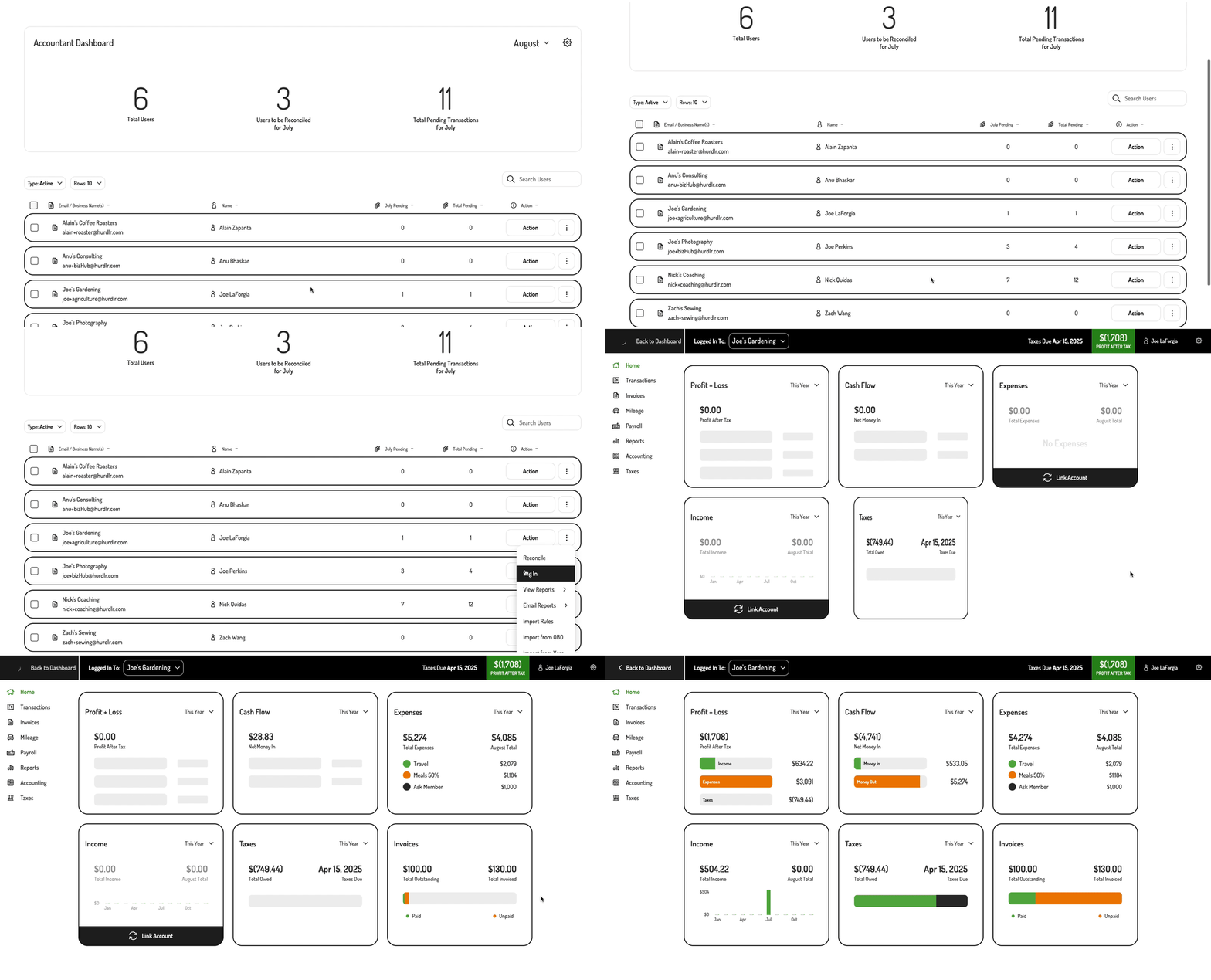
Tight's [Bookkeeper Dashboard](/v5.0/embeddable-ui/bookkeepers/bookkeeper-dashboard) makes it easy for bookkeepers to log into specific businesses, with vital financials available at a glance to bookkeepers almost instantly upon logging in. Any changes made by a bookkeeper logged into a specific business will be tracked in Tight's Audit Trail as having been made by that specific bookkeeper.
## 1. Logging into a specific business from the Accountant Dashboard
A bookkeeper can take advantage of the [`Log In` user row action](/v5.0/embeddable-ui/bookkeepers/user-management#1-user-row-actions) in order to log into a specific business from Tight's Accountant Dashboard, as shown below:
 ## 2. Render a specific business for a bookkeeper
If you'd like to allow your bookkeeper to navigate straight into one of your client's accounts onto a specific screen, you can simply invoke the following line of javascript:
```javascript theme={null}
Hurdlr.renderAccountantUserScreen(elementId, screenName, userId);
```
To render a user screen for the bookkeeper, you will need to provide the following parameters:
| Field | Description | Format |
| :--------- | :---------------------------------------------------------------------------------------------------------------------------------------------------------------------------- | :------------------------------------------------------------------------------------------------------------------------- |
| elementId | HTML `id` of the main `
## 2. Render a specific business for a bookkeeper
If you'd like to allow your bookkeeper to navigate straight into one of your client's accounts onto a specific screen, you can simply invoke the following line of javascript:
```javascript theme={null}
Hurdlr.renderAccountantUserScreen(elementId, screenName, userId);
```
To render a user screen for the bookkeeper, you will need to provide the following parameters:
| Field | Description | Format |
| :--------- | :---------------------------------------------------------------------------------------------------------------------------------------------------------------------------- | :------------------------------------------------------------------------------------------------------------------------- |
| elementId | HTML `id` of the main `` where the screen will be rendered | Any string |
| screenName | Screen within a client's account to render for the bookkeeper | See list of available [user screens](/v5.0/getting-started/quickstart/embedded-ui#3-adding-specific-screens-into-your-app) |
| userId | Id in your DB of the client whose account will be rendered, as passed in when initially [registering a user in the Tight API](/v5.0/getting-started/quickstart/user-creation) | Any string |