

How it works
Tight’s QuickBooks Online Import UX and API make it easy to seamlessly migrate small businesses from QuickBooks Online to your platform.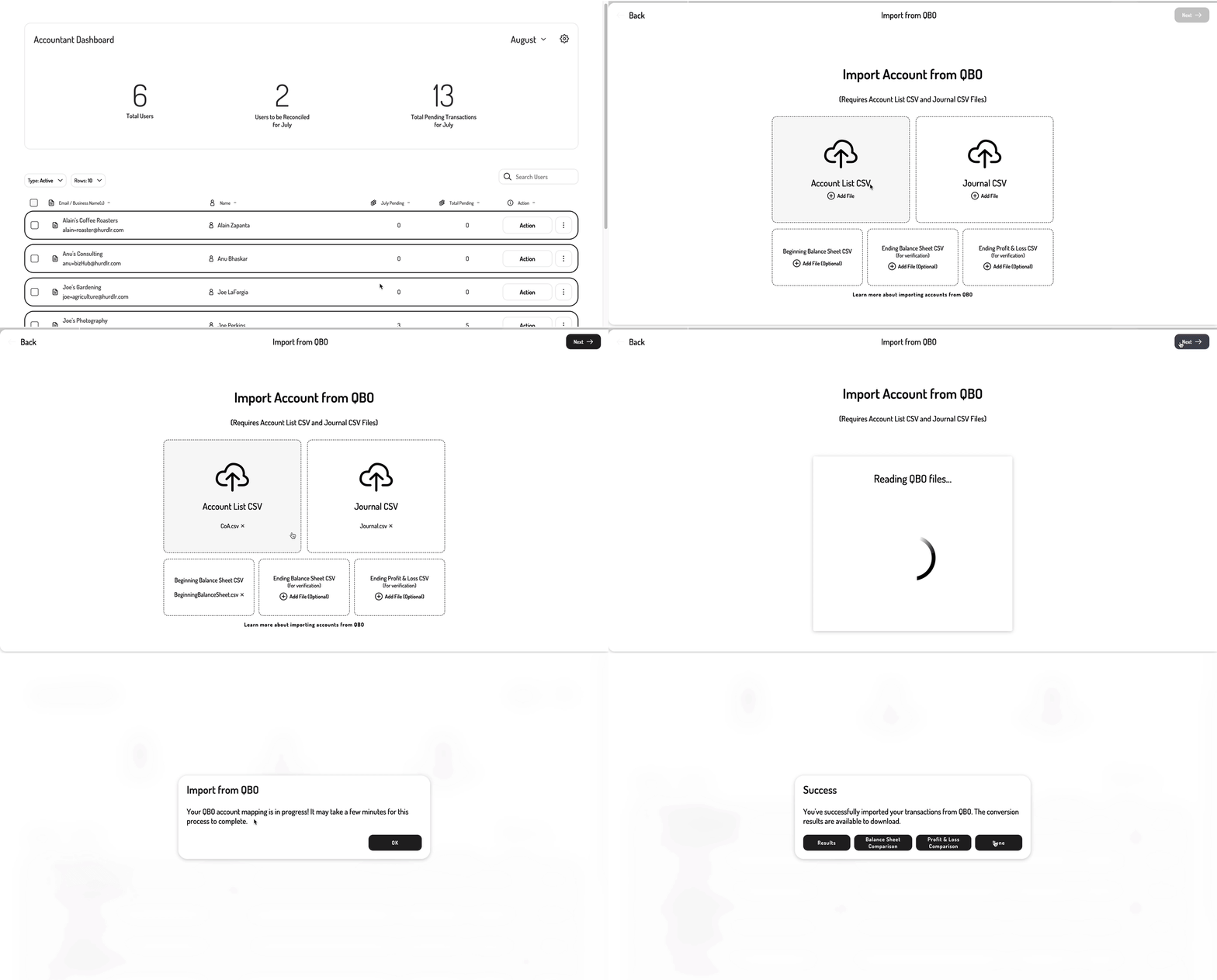
Export reports from QuickBooks Online
Tight’s Import tool ingests a few reports exported from your user’s QuickBooks Online account: a) Chart of Accountsb) Journal
c) Beginning Balance Sheet
d) Ending Balance Sheet
e) Ending Profit & Loss
Run the import
During the import, Tight intelligently maps the user’s old Chart of Accounts to your customized Chart of Accounts. Tight’s Import UX makes it simple to make any adjustments to this mapping inline or to add new accounts for use during the import process.Verify the import
Lastly, Tight’s Import UX generates comparative verification reports at the end of the import to prove the success of the migration. The following reports are generated: a) A comparison of the ending Balance Sheet from QuickBooks Online and that from Tightb) A comparison of the ending Profit & Loss from QuickBooks Online and that from Tight The Tight API combines the corresponding reports from QuickBooks Online and the Tight API, presenting the user’s successful import in their newly migrated account.