

1. User Row Actions
There are already several useful actions for managing users available to bookkeepers on each user row within the Accountant Dashboard:
If you’d like to add your own custom actions on each user row in addition to those already available within the Accountant Dashboard, you can populate a
userActions array within the options object. Each object within that array should contain a displayName string and value string.
You will also want to take advantage of the Tight Embedded experience’s registerAccountantUserActionListener, which will invoke the callback function you provide whenever one of your bookkeepers presses on one of your custom user actions. To register the listener, simply add the following line of JS to be ran once after Hurdlr.init({...}):
myAccountantUserActionCallback will be invoked, with a JSON object as the single argument, containing the userId as well as the value of the action that you provided when defining the userActions array.
2. Updating, Removing, and Restoring Bookkeepers
The ability to update, remove, and restore bookkeepers is already included within the Accountant Dashboard, as shown below: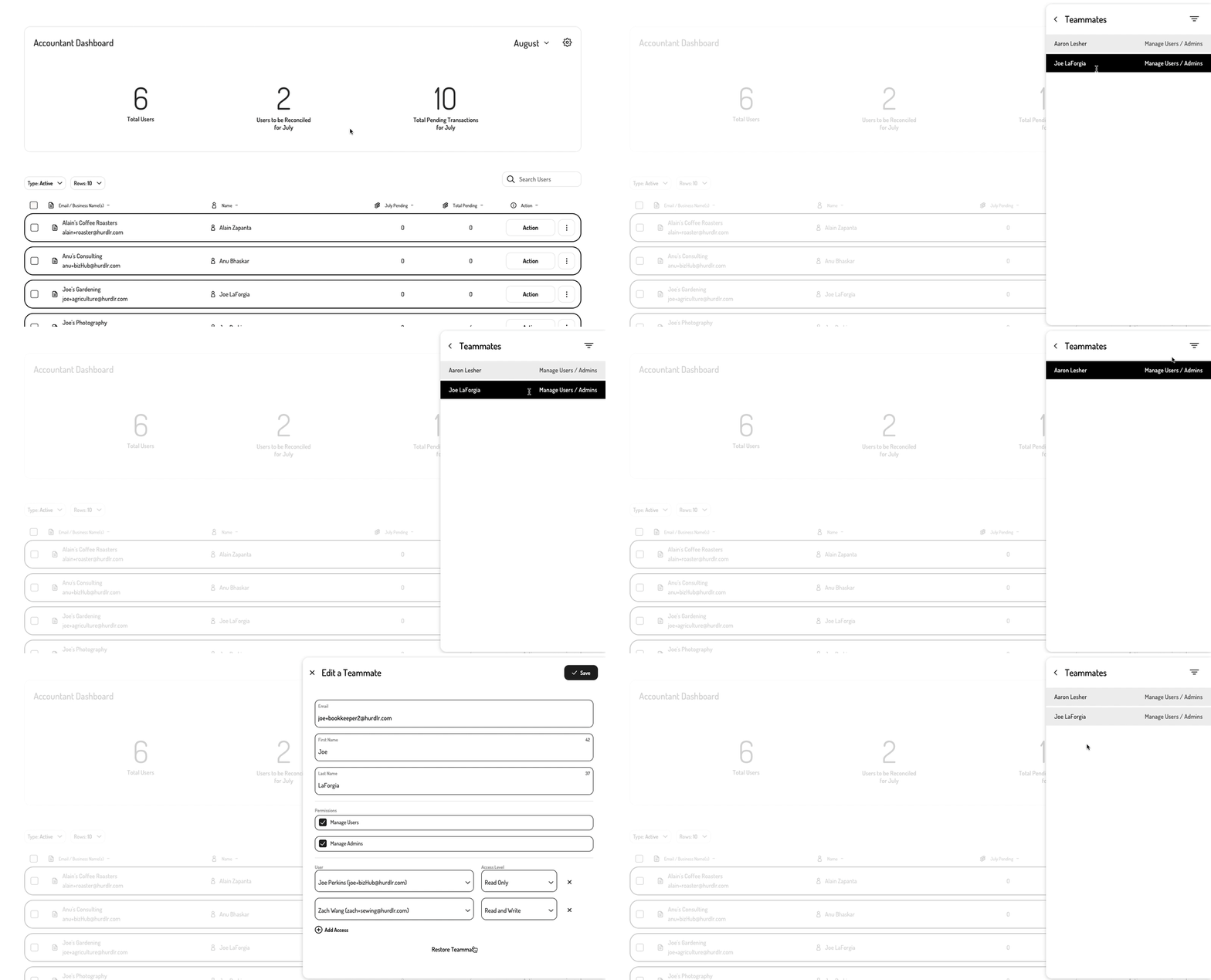
3. Adding Bookkeepers and Users
If you want to include the ability to add users and bookkeepers from within the Accountant Dashboard, then you will want to take advantage of the Tight Embedded experience’sregisterAccountantDashListener functionality. Without this listener registered, the ability to add users and bookkeepers will be hidden within the Accountant Dashboard, and they will need to be added via Tight’s Save a teammate endpoint. Editing, removing, and restoring will still be available within the Embedded experience regardless of whether the listener is registered or not.
To register this listener, simply add the following line of JS to be ran once after Hurdlr.init({...}):
myAccountantDashCallback will be invoked with a JSON object as the single argument, containing the following attributes:
A Bookkeeper object has the following attributes:
A User object has the following attributes:
An example of the arguments passed to
myAccountantDashCallback for the Hurdlr.UPDATE_BOOKKEEPER event type is shown below: