Tight integrates directly with Google Cloud Storage to periodically upload raw accounting data to your own GCS buckets. By pushing data into your GCS infrastructure, Tight eliminates the need for your data team to build direct connections to the Tight API, allowing your team to work in the data stack they’re already using.Data is exported in Parquet file format on daily, weekly, or monthly intervals, including bank linkage data, invoices, lifecycle events, and transactions. Learn more about available data types and use cases in the Data Lakes guide.
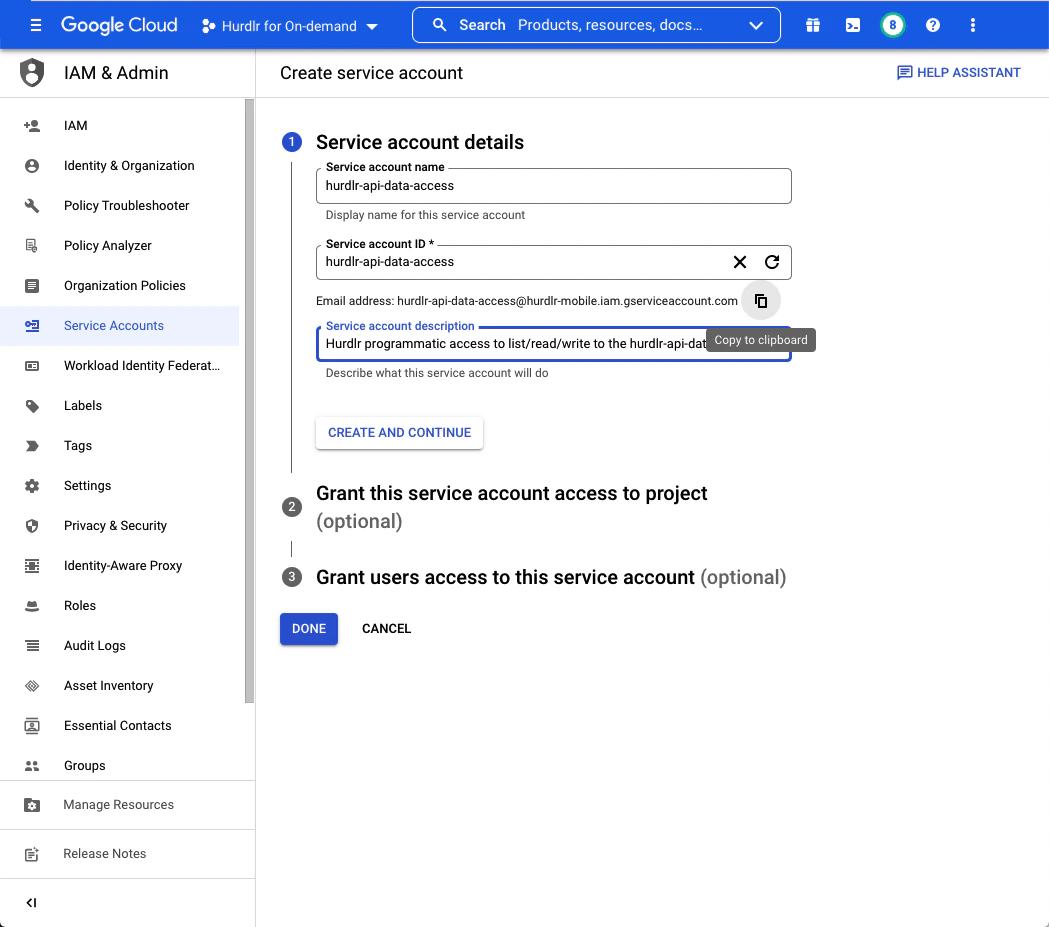
First, create a service account to grant programmatic access to the Google Cloud Storage bucket.In the Google Cloud Console, navigate to IAM & Admin → Service Accounts and click “Create Service Account”. Provide a descriptive name like “tight-api-data-access” and description:After entering the service account details, click “Copy to clipboard” below the email address that was created. Save this email address for later steps. Then click “CREATE AND CONTINUE” followed by “DONE”.
Keep the service account email address handy - you’ll need it in later steps to grant bucket permissions.
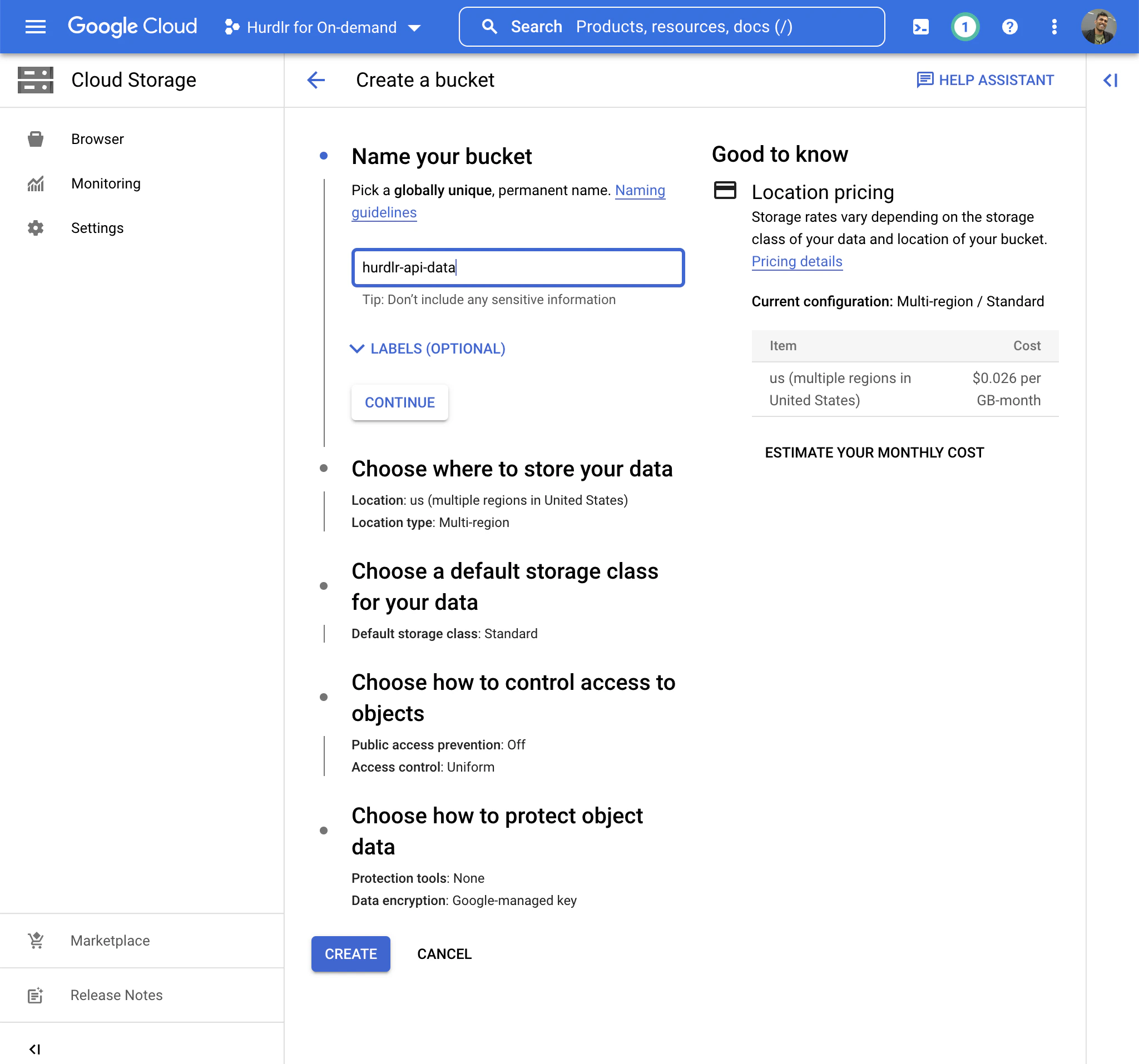
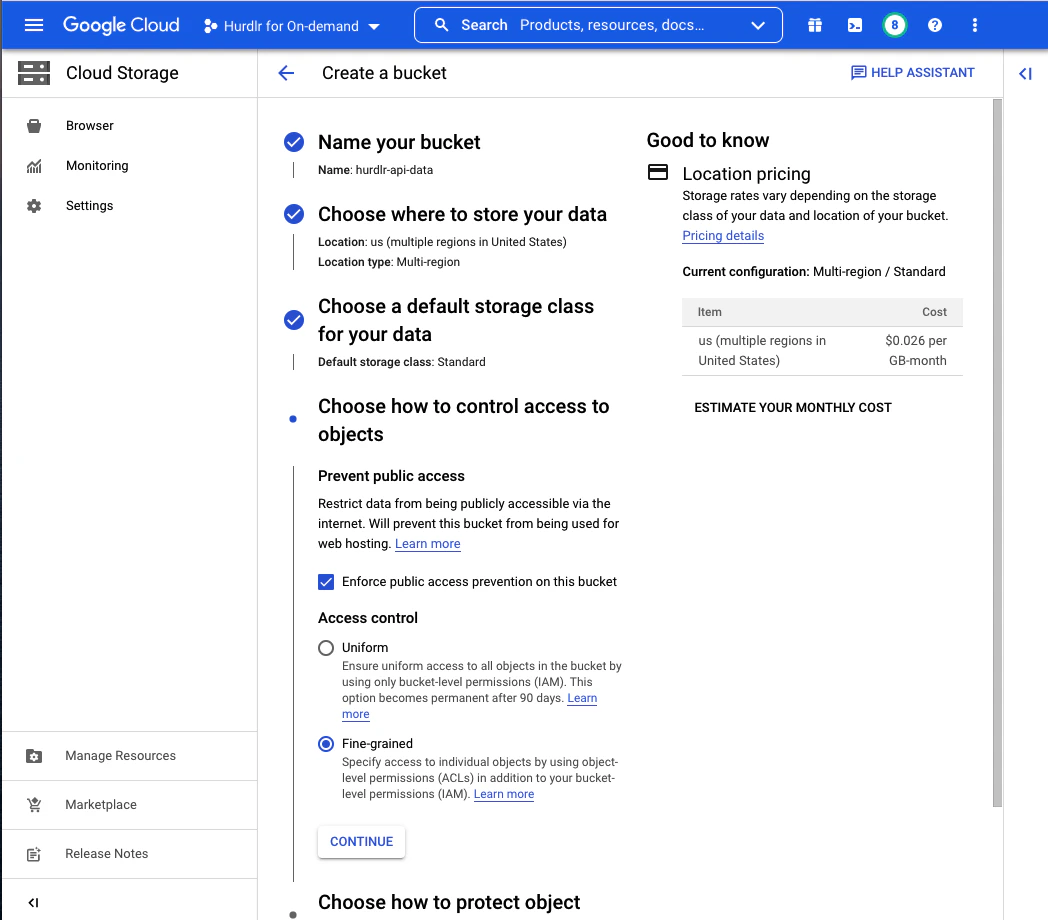
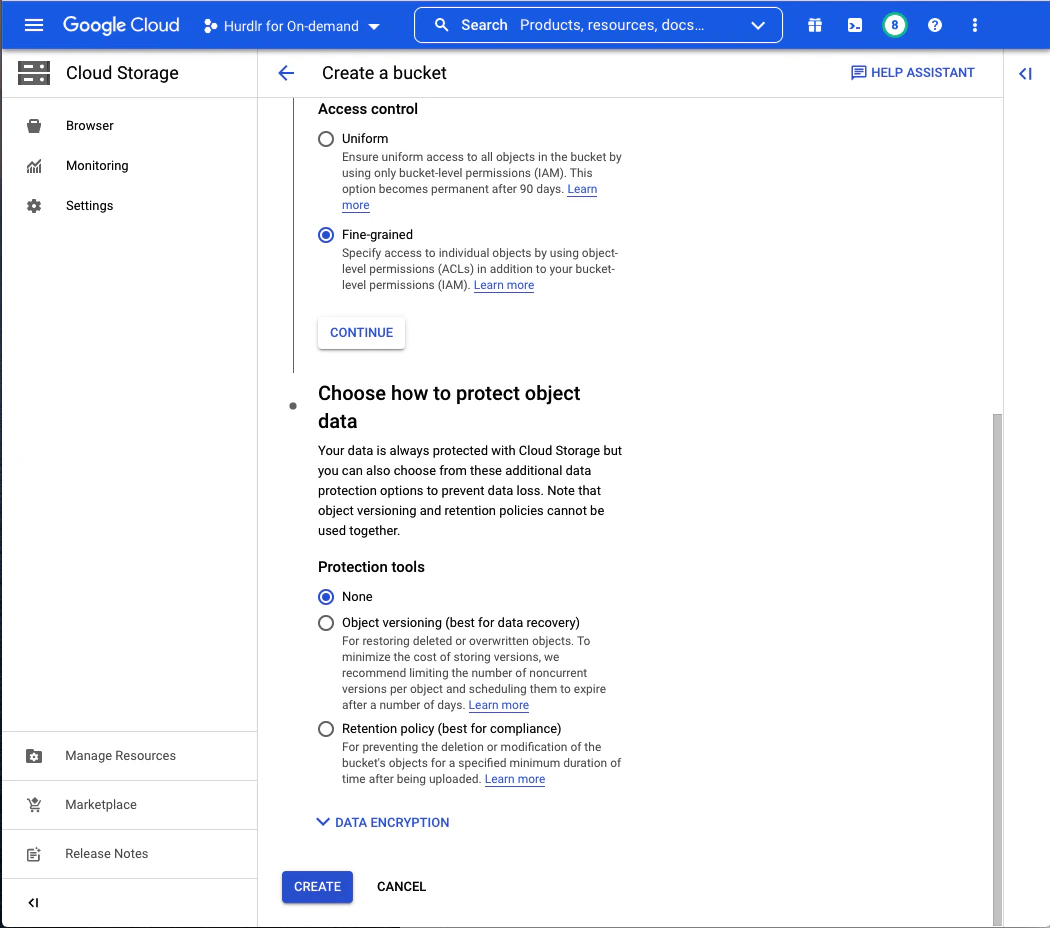
Next, create a Google Cloud Storage bucket where Tight will store your data. We recommend naming this bucket “tight-api-data”:For “Choose where to store your data” and “Choose a default storage class for your data”, you can use the default values.For “Choose how to control access to objects”, select “Enforce public access prevention on this bucket” and “Access Control: Fine-grained”:For “Choose how to protect object data”, select “None” unless your compliance requirements dictate otherwise. Be aware that data protection options will increase your storage costs.Click “CREATE” to finish creating the bucket.
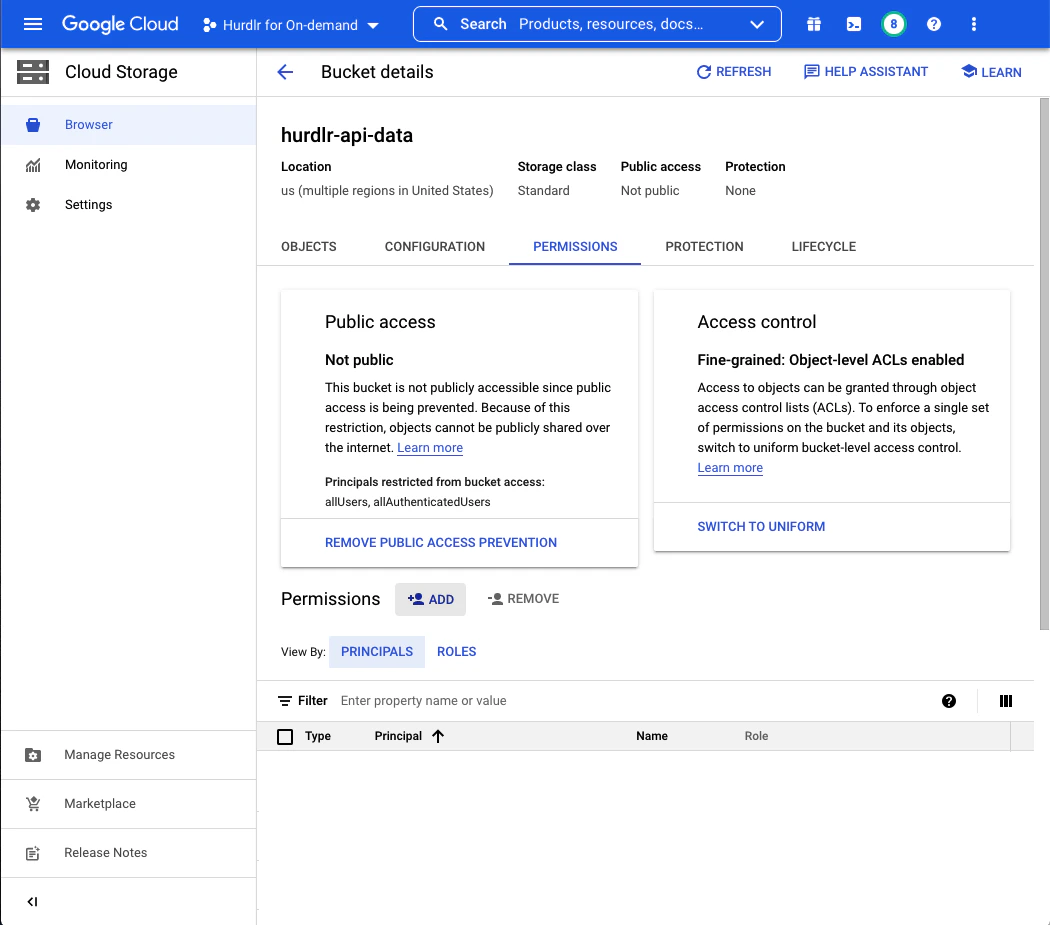
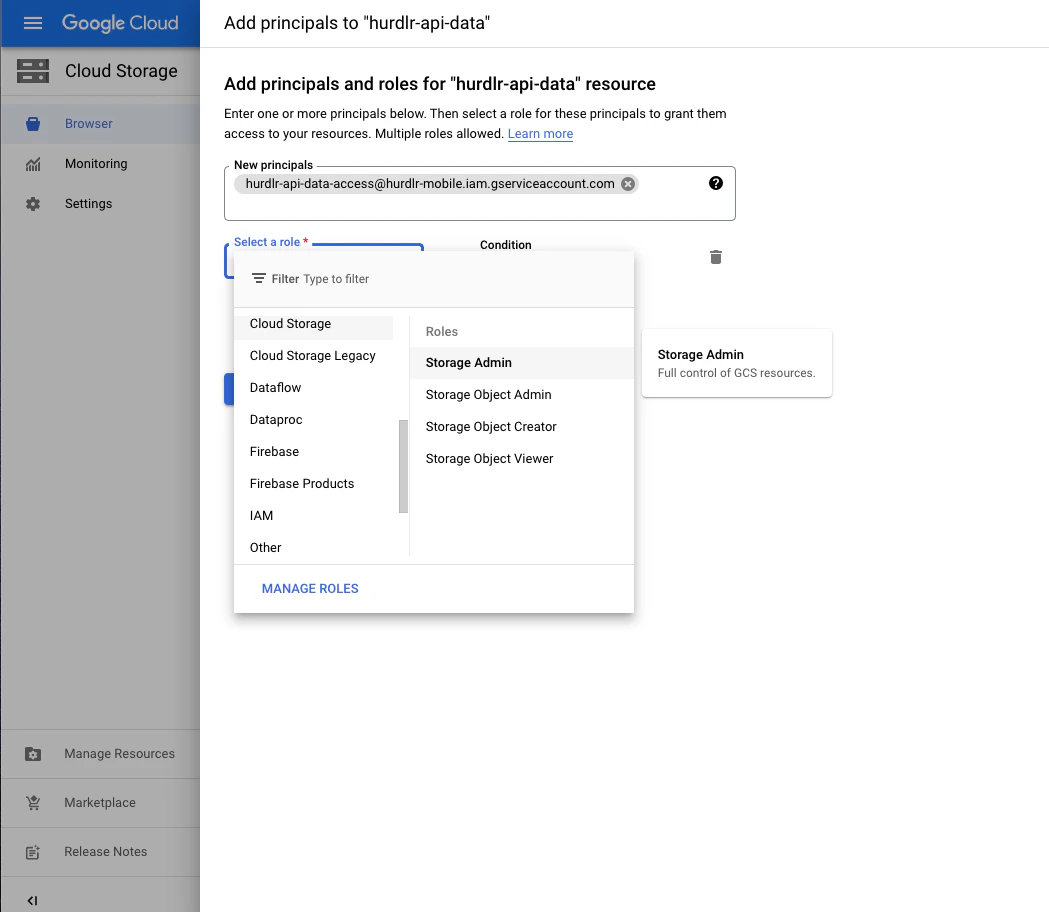
Once the bucket is created, you’ll be taken to the Bucket Details screen. Click on the “PERMISSIONS” tab and then click “ADD”:In the “New Principals” field, paste the service account email address you copied earlier, and set the role to “Storage Object Admin”:Click “SAVE” to grant the service account access to your bucket.
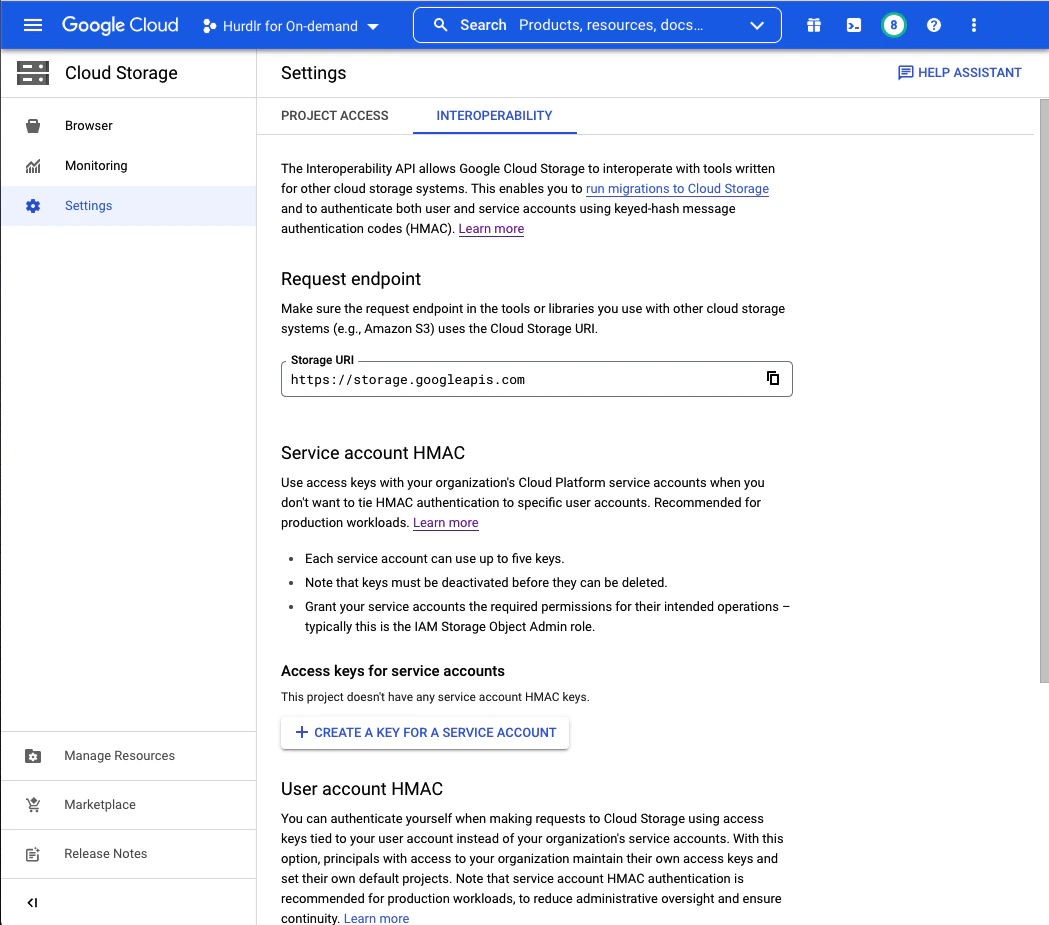
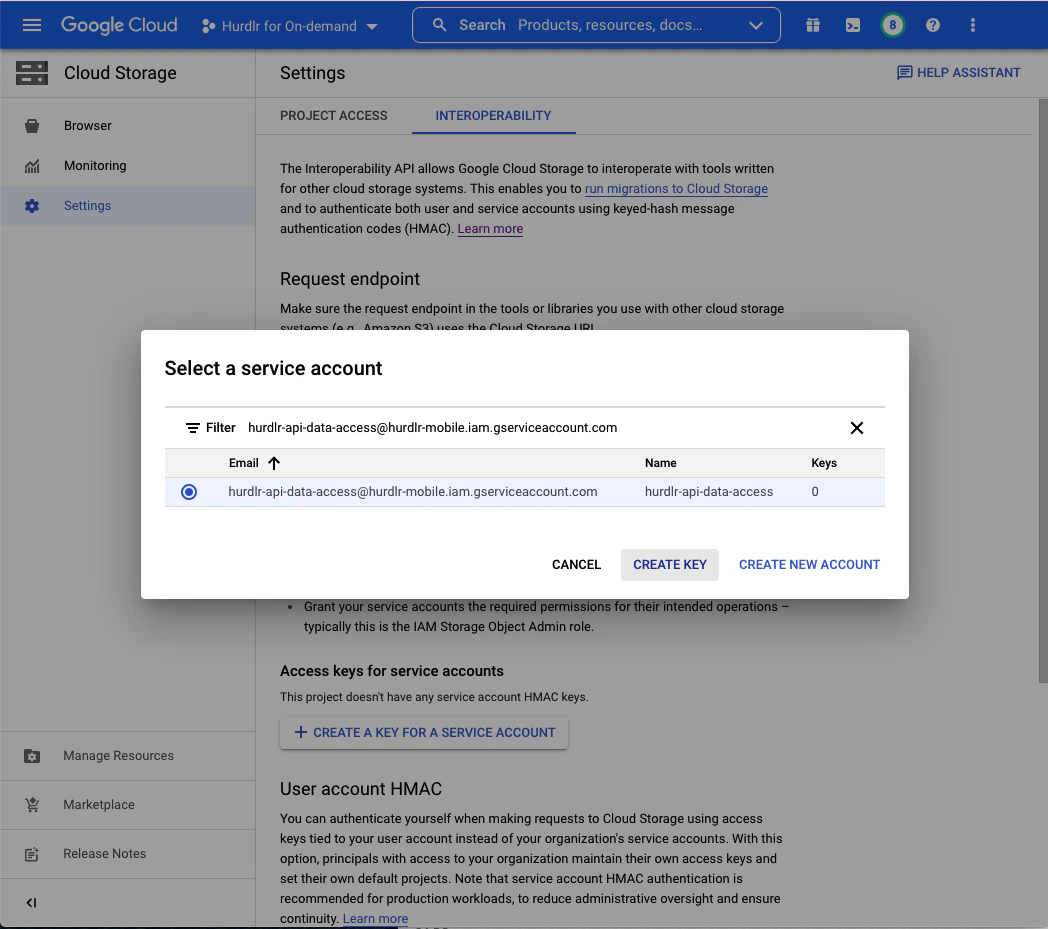
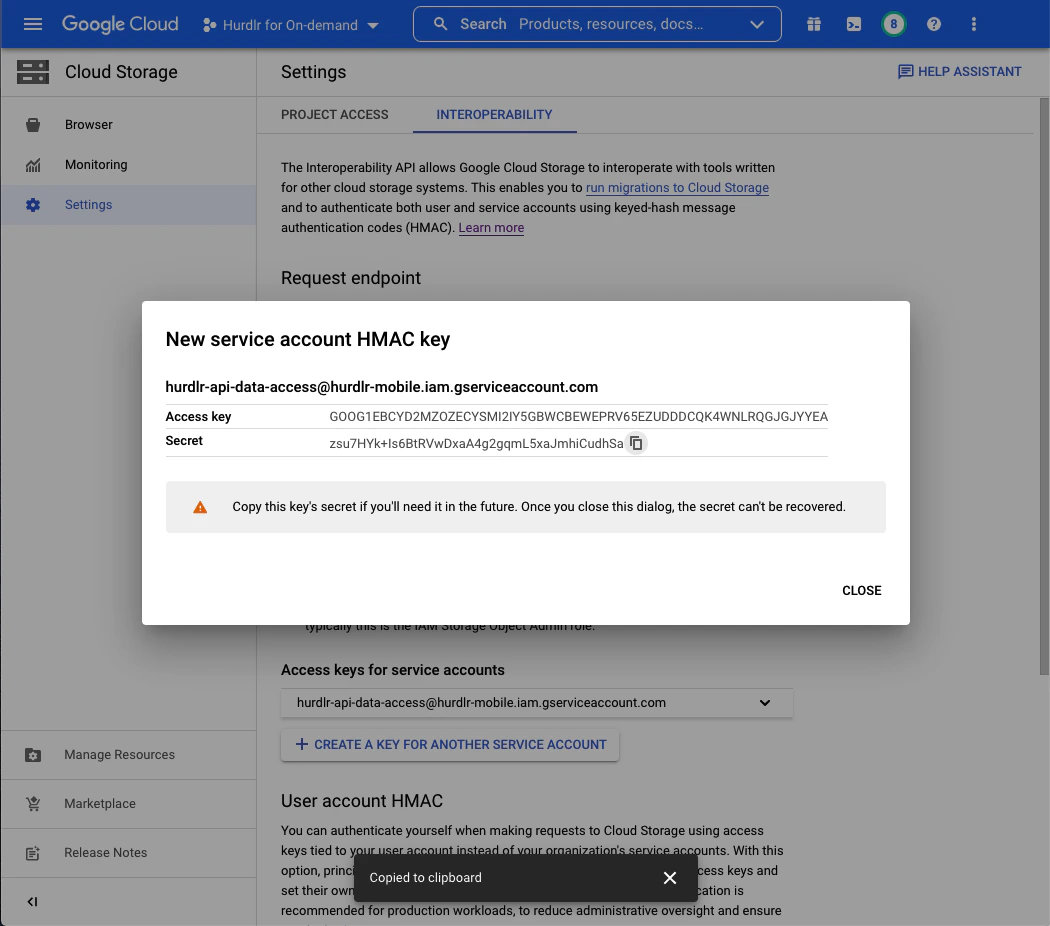
Next, create a service account HMAC key for authentication.From the Cloud Storage screen, click on “Settings”, then select the “Interoperability” tab:Click “CREATE A KEY FOR A SERVICE ACCOUNT”, paste the service account email address, and select the row for that account:Click “CREATE KEY” to generate the HMAC key. You’ll see a screen displaying both the Access Key and Secret. Copy both values and save them securely:
Store the Access Key and Secret securely - you won’t be able to view the Secret again after this screen.
Contact Tight directly at api@tight.com for instructions on how to securely share:
Your GCS bucket name
The HMAC Access Key
The HMAC Secret
Once configured, Tight will automatically begin uploading data files to your GCS bucket based on your preferred schedule (daily, weekly, or monthly). Files are organized in a consistent directory structure within your bucket, making it easy to integrate with your existing data pipelines and analytics tools.
{"docsConfig":{"theme":"aspen","$schema":"https://mintlify.com/docs.json","name":"Tight API","colors":{"primary":"#2ab2d1","light":"#2ad17b","dark":"#009c75"},"logo":{"light":"https://mintcdn.com/tight-7c882d74/g3bHUuD81P-TYOyV/logo/light.svg?fit=max\u0026auto=format\u0026n=g3bHUuD81P-TYOyV\u0026q=85\u0026s=7efc18a7fc4dff02d17ed0eb2de01e0c","dark":"https://mintcdn.com/tight-7c882d74/g3bHUuD81P-TYOyV/logo/dark.svg?fit=max\u0026auto=format\u0026n=g3bHUuD81P-TYOyV\u0026q=85\u0026s=59da536242351519afec1ab104b7d80c"},"favicon":"https://mintcdn.com/tight-7c882d74/PBb8Gf8jW9PRt_Fg/favicon.svg?fit=max\u0026auto=format\u0026n=PBb8Gf8jW9PRt_Fg\u0026q=85\u0026s=1871b49a7fbf78ef4003d250529f1140","navbar":{"primary":{"type":"button","label":"Request Access","href":"https://www.tight.com/#get-started"}},"seo":{"metatags":{"canonical":"https://docs.tight.com"}},"integrations":{"ga4":{"measurementId":"G-64X67ZWYYY"}},"contextual":{"options":["claude","assistant","cursor","vscode","mcp","copy","chatgpt","perplexity","view"],"display":"header"},"styling":{"latex":true},"navigation":{"pages":[]}},"deployment":{"deploymentMetadataValue":{"subdomain":"tight-7c882d74","hasAudioNarration":false,"actualSubdomain":"tight-7c882d74","customDomains":["docs.tight.com"],"gitSource":{"type":"github","owner":"tight-embedded","repo":"traxdocs","deployBranch":"dev","contentDirectory":"","isPrivate":true,"mountPath":"","label":""},"chroma":{"liveDeploymentHistoryId":"6ae2220ede9638b967144f13","collectionId":"097604f8-c897-4d42-bfda-5aebc038a09a","schemaVersion":"v3","latestBuiltDeploymentHistoryId":"6ae2220ede9638b967144f13"},"entitlements":{"AI_CHAT":{"status":"ENABLED"},"WEB_MCP":{"status":"ENABLED"},"NARRATION":{"status":"ENABLED"}},"buildId":"6ae2220ede9638b967144f13","clientVersion":"0.0.4006","searchFilterCounts":[{"language":"default","tag":"API Reference","count":472},{"language":"default","tag":"Reference","count":469},{"language":"default","tag":"Company Management","count":165},{"language":"default","tag":"Guides","count":88},{"language":"default","tag":"Embedded UI","count":78},{"language":"default","tag":"Integrations","count":69},{"language":"default","tag":"Products","count":62},{"language":"default","tag":"Invoicing","count":45},{"language":"default","tag":"Banks","count":44},{"language":"default","tag":"Transactions","count":40}]},"assistantConfig":{},"basePath":"","hasChatPermissions":true,"hasWebMcpPermissions":true,"toggles":[{"name":"kill-isr","enabled":true,"variant":{"name":"disabled","enabled":false,"feature_enabled":true},"impressionData":false},{"name":"agent-mintlify-slack","enabled":true,"variant":{"name":"disabled","enabled":false,"feature_enabled":true},"impressionData":false},{"name":"editor-v7-file-tree","enabled":true,"variant":{"name":"disabled","enabled":false,"feature_enabled":true},"impressionData":false},{"name":"agent-integrations-settings","enabled":true,"variant":{"name":"disabled","enabled":false,"feature_enabled":true},"impressionData":false},{"name":"automations-pr-grouping","enabled":true,"variant":{"name":"disabled","enabled":false,"feature_enabled":true},"impressionData":false},{"name":"custom-prefix","enabled":true,"variant":{"name":"disabled","enabled":false,"feature_enabled":true},"impressionData":false},{"name":"analytics-v7","enabled":true,"variant":{"name":"disabled","enabled":false,"feature_enabled":true},"impressionData":false},{"name":"user-flows-analytics","enabled":true,"variant":{"name":"disabled","enabled":false,"feature_enabled":true},"impressionData":false},{"name":"no-publish-flow","enabled":true,"variant":{"name":"disabled","enabled":false,"feature_enabled":true},"impressionData":false},{"name":"workos-onboarding","enabled":true,"variant":{"name":"disabled","enabled":false,"feature_enabled":true},"impressionData":false},{"name":"llms-txt-v2","enabled":true,"variant":{"name":"disabled","enabled":false,"feature_enabled":true},"impressionData":false},{"name":"pause-universal-search-reconcile","enabled":true,"variant":{"name":"disabled","enabled":false,"feature_enabled":true},"impressionData":false},{"name":"snapshot-serving-live","enabled":true,"variant":{"name":"disabled","enabled":false,"feature_enabled":true},"impressionData":false},{"name":"stripTemperatureMiddleware","enabled":true,"variant":{"name":"disabled","enabled":false,"feature_enabled":true},"impressionData":false},{"name":"per-site-search-delta","enabled":true,"variant":{"name":"disabled","enabled":false,"feature_enabled":true},"impressionData":false},{"name":"support-platform-pylon-zendesk","enabled":true,"variant":{"name":"disabled","enabled":false,"feature_enabled":true},"impressionData":false},{"name":"snapshot-serving","enabled":true,"variant":{"name":"disabled","enabled":false,"feature_enabled":true},"impressionData":false},{"name":"instant-rollback","enabled":true,"variant":{"name":"disabled","enabled":false,"feature_enabled":true},"impressionData":false},{"name":"granular-notifications-server","enabled":true,"variant":{"name":"disabled","enabled":false,"feature_enabled":true},"impressionData":false},{"name":"granular-notifications","enabled":true,"variant":{"name":"disabled","enabled":false,"feature_enabled":true},"impressionData":false},{"name":"editor-private-page-search","enabled":true,"variant":{"name":"disabled","enabled":false,"feature_enabled":true},"impressionData":false},{"name":"automations-fable","enabled":true,"variant":{"name":"disabled","enabled":false,"feature_enabled":true},"impressionData":false},{"name":"fixed-ai-action-pricing","enabled":true,"variant":{"name":"disabled","enabled":false,"feature_enabled":true},"impressionData":false},{"name":"automation-resolve-merge-conflict","enabled":true,"variant":{"name":"disabled","enabled":false,"feature_enabled":true},"impressionData":false},{"name":"scoped-publishing","enabled":true,"variant":{"name":"disabled","enabled":false,"feature_enabled":true},"impressionData":false},{"name":"mintql","enabled":true,"variant":{"name":"disabled","enabled":false,"feature_enabled":true},"impressionData":false},{"name":"page-level-analytics","enabled":true,"variant":{"name":"disabled","enabled":false,"feature_enabled":true},"impressionData":false},{"name":"editor-version-history-v2","enabled":true,"variant":{"name":"disabled","enabled":false,"feature_enabled":true},"impressionData":false},{"name":"editor-nav-generations","enabled":true,"variant":{"name":"disabled","enabled":false,"feature_enabled":true},"impressionData":false},{"name":"billing-page-v2","enabled":true,"variant":{"name":"disabled","enabled":false,"feature_enabled":true},"impressionData":false},{"name":"workspace-projects","enabled":true,"variant":{"name":"disabled","enabled":false,"feature_enabled":true},"impressionData":false},{"name":"assistant-v5","enabled":true,"variant":{"name":"disabled","enabled":false,"feature_enabled":true},"impressionData":false},{"name":"byok-sep-25","enabled":true,"variant":{"name":"disabled","enabled":false,"feature_enabled":true},"impressionData":false},{"name":"fork-pr-previews","enabled":true,"variant":{"name":"disabled","enabled":false,"feature_enabled":true},"impressionData":false},{"name":"revalidation-jwt","enabled":true,"variant":{"name":"disabled","enabled":false,"feature_enabled":true},"impressionData":false},{"name":"vite-origin","enabled":true,"variant":{"name":"disabled","enabled":false,"feature_enabled":true},"impressionData":false},{"name":"editor-agent-model-picker","enabled":true,"variant":{"name":"disabled","enabled":false,"feature_enabled":true},"impressionData":false},{"name":"billing-updated-9-15","enabled":true,"variant":{"name":"disabled","enabled":false,"feature_enabled":true},"impressionData":false},{"name":"workos-sso-scim","enabled":true,"variant":{"name":"disabled","enabled":false,"feature_enabled":true},"impressionData":false},{"name":"hobby-abuse-scan","enabled":true,"variant":{"name":"disabled","enabled":false,"feature_enabled":true},"impressionData":false},{"name":"dashboard-inbox","enabled":true,"variant":{"name":"disabled","enabled":false,"feature_enabled":true},"impressionData":false},{"name":"workos-signup","enabled":true,"variant":{"name":"disabled","enabled":false,"feature_enabled":true},"impressionData":false},{"name":"workos-enabled","enabled":true,"variant":{"name":"disabled","enabled":false,"feature_enabled":true},"impressionData":false}],"googleFontsInlined":false},"customCss":[{"filePath":"style.css","content":"#content-area:has([data-page-title=Playground]) div:has(.chat-assistant-floating-input),#sidebar:has(~#content-container [data-page-title=Playground]){display:none}#content-container:has([data-page-title=Playground]){margin-left:0}#sidebar-content a{width:auto}#navigation-items{width:100%}"}],"page":{"pagePath":"integrations/analytics/google-cloud-storage","slug":"/integrations/analytics/google-cloud-storage","pageMetadata":{"title":"Google Cloud Storage","description":"Push accounting data directly to your Google Cloud Storage buckets","href":"/integrations/analytics/google-cloud-storage"},"description":{"compiledSource":"\"use strict\";\nconst {jsx: _jsx} = arguments[0];\nconst {useMDXComponents: _provideComponents} = arguments[0];\nfunction _createMdxContent(props) {\n const _components = {\n p: \"p\",\n ..._provideComponents(),\n ...props.components\n };\n return _jsx(_components.p, {\n children: \"Push accounting data directly to your Google Cloud Storage buckets\"\n });\n}\nfunction MDXContent(props = {}) {\n const {wrapper: MDXLayout} = {\n ..._provideComponents(),\n ...props.components\n };\n return MDXLayout ? _jsx(MDXLayout, {\n ...props,\n children: _jsx(_createMdxContent, {\n ...props\n })\n }) : _createMdxContent(props);\n}\nreturn {\n default: MDXContent\n};\n","frontmatter":{},"scope":{}},"pageType":"default","mdx":{"mdxSource":{"compiledSource":"\"use strict\";const{Fragment:_Fragment,jsx:_jsx,jsxs:_jsxs}=arguments[0];const{useMDXComponents:_provideComponents}=arguments[0];function _createMdxContent(props){const _components={a:`a`,li:`li`,p:`p`,ul:`ul`,..._provideComponents(),...props.components},{Heading,OptimizedImage,Tip}=_components;if(!Heading)_missingMdxReference(`Heading`,true);if(!OptimizedImage)_missingMdxReference(`OptimizedImage`,true);if(!Tip)_missingMdxReference(`Tip`,true);return _jsxs(_Fragment,{children:[_jsx(Heading,{level:`2`,id:`overview`,children:`Overview`}),`\n`,_jsx(_components.p,{children:`Tight integrates directly with Google Cloud Storage to periodically upload raw accounting data to your own GCS buckets. By pushing data into your GCS infrastructure, Tight eliminates the need for your data team to build direct connections to the Tight API, allowing your team to work in the data stack they’re already using.`}),`\n`,_jsxs(_components.p,{children:[`Data is exported in `,_jsx(_components.a,{href:`https://parquet.apache.org/`,children:`Parquet file`}),` format on daily, weekly, or monthly intervals, including bank linkage data, invoices, lifecycle events, and transactions. Learn more about available data types and use cases in the `,_jsx(_components.a,{href:`/guides/business-owners/data-lakes`,children:`Data Lakes guide`}),`.`]}),`\n`,_jsx(Heading,{level:`2`,id:`create-a-service-account`,children:`Create a Service Account`}),`\n`,_jsxs(_components.p,{children:[`First, `,_jsx(_components.a,{href:`https://cloud.google.com/docs/authentication/production#create_service_account`,children:`create a service account`}),` to grant programmatic access to the Google Cloud Storage bucket.`]}),`\n`,_jsx(_components.p,{children:`In the Google Cloud Console, navigate to IAM \u0026 Admin → Service Accounts and click “Create Service Account”. Provide a descriptive name like “tight-api-data-access” and description:`}),`\n`,_jsx(OptimizedImage,{src:`https://mintcdn.com/tight-7c882d74/PBb8Gf8jW9PRt_Fg/integrations/analytics/GCSServiceAccount.png?fit=max\u0026auto=format\u0026n=PBb8Gf8jW9PRt_Fg\u0026q=85\u0026s=4d406aa5e8f3665fa7ac13ab56461c4d`,alt:`Create Service Account`,\"data-og-width\":`1049`,width:`1049`,\"data-og-height\":`927`,height:`927`,\"data-path\":`integrations/analytics/GCSServiceAccount.png`,\"data-optimize\":`true`,\"data-opv\":`3`,srcset:`https://mintcdn.com/tight-7c882d74/PBb8Gf8jW9PRt_Fg/integrations/analytics/GCSServiceAccount.png?w=280\u0026fit=max\u0026auto=format\u0026n=PBb8Gf8jW9PRt_Fg\u0026q=85\u0026s=7bfbb9e6b7075e91785629c3edf99035 280w, https://mintcdn.com/tight-7c882d74/PBb8Gf8jW9PRt_Fg/integrations/analytics/GCSServiceAccount.png?w=560\u0026fit=max\u0026auto=format\u0026n=PBb8Gf8jW9PRt_Fg\u0026q=85\u0026s=02509cea92bd3d57d3d5358a6a98b3f6 560w, https://mintcdn.com/tight-7c882d74/PBb8Gf8jW9PRt_Fg/integrations/analytics/GCSServiceAccount.png?w=840\u0026fit=max\u0026auto=format\u0026n=PBb8Gf8jW9PRt_Fg\u0026q=85\u0026s=18df4b777479c5bd192ec6c2793d0a16 840w, https://mintcdn.com/tight-7c882d74/PBb8Gf8jW9PRt_Fg/integrations/analytics/GCSServiceAccount.png?w=1100\u0026fit=max\u0026auto=format\u0026n=PBb8Gf8jW9PRt_Fg\u0026q=85\u0026s=fd423eaa812139a1ff1ec1055da571e9 1100w, https://mintcdn.com/tight-7c882d74/PBb8Gf8jW9PRt_Fg/integrations/analytics/GCSServiceAccount.png?w=1650\u0026fit=max\u0026auto=format\u0026n=PBb8Gf8jW9PRt_Fg\u0026q=85\u0026s=7aad3f030bdd00f9ae9fc558219ad3ac 1650w, https://mintcdn.com/tight-7c882d74/PBb8Gf8jW9PRt_Fg/integrations/analytics/GCSServiceAccount.png?w=2500\u0026fit=max\u0026auto=format\u0026n=PBb8Gf8jW9PRt_Fg\u0026q=85\u0026s=9a81387529a99cba929fa6a3f4ab9d2b 2500w`}),`\n`,_jsx(_components.p,{children:`After entering the service account details, click “Copy to clipboard” below the email address that was created. Save this email address for later steps. Then click “CREATE AND CONTINUE” followed by “DONE”.`}),`\n`,_jsx(Tip,{children:_jsx(_components.p,{children:`Keep the service account email address handy - you’ll need it in later steps to grant bucket permissions.`})}),`\n`,_jsx(Heading,{level:`2`,id:`create-a-google-cloud-storage-bucket`,children:`Create a Google Cloud Storage Bucket`}),`\n`,_jsxs(_components.p,{children:[`Next, `,_jsx(_components.a,{href:`https://cloud.google.com/storage/docs/creating-buckets#create_a_new_bucket`,children:`create a Google Cloud Storage bucket`}),` where Tight will store your data. We recommend naming this bucket “tight-api-data”:`]}),`\n`,_jsx(OptimizedImage,{src:`https://mintcdn.com/tight-7c882d74/PBb8Gf8jW9PRt_Fg/integrations/analytics/GCSCreateBucket.png?fit=max\u0026auto=format\u0026n=PBb8Gf8jW9PRt_Fg\u0026q=85\u0026s=d1149e838417324f048a85671100cd39`,alt:`Create GCS Bucket`,\"data-og-width\":`2048`,width:`2048`,\"data-og-height\":`1914`,height:`1914`,\"data-path\":`integrations/analytics/GCSCreateBucket.png`,\"data-optimize\":`true`,\"data-opv\":`3`,srcset:`https://mintcdn.com/tight-7c882d74/PBb8Gf8jW9PRt_Fg/integrations/analytics/GCSCreateBucket.png?w=280\u0026fit=max\u0026auto=format\u0026n=PBb8Gf8jW9PRt_Fg\u0026q=85\u0026s=705011cc82cd7ce2cf0a09c8c451aa92 280w, https://mintcdn.com/tight-7c882d74/PBb8Gf8jW9PRt_Fg/integrations/analytics/GCSCreateBucket.png?w=560\u0026fit=max\u0026auto=format\u0026n=PBb8Gf8jW9PRt_Fg\u0026q=85\u0026s=a0e6a157ab9ecc3790d4d50bc6e687b4 560w, https://mintcdn.com/tight-7c882d74/PBb8Gf8jW9PRt_Fg/integrations/analytics/GCSCreateBucket.png?w=840\u0026fit=max\u0026auto=format\u0026n=PBb8Gf8jW9PRt_Fg\u0026q=85\u0026s=bb5b057a9be3f178c47d43b02166ae7a 840w, https://mintcdn.com/tight-7c882d74/PBb8Gf8jW9PRt_Fg/integrations/analytics/GCSCreateBucket.png?w=1100\u0026fit=max\u0026auto=format\u0026n=PBb8Gf8jW9PRt_Fg\u0026q=85\u0026s=a36db3911bba64fe23794bf2ecc5d896 1100w, https://mintcdn.com/tight-7c882d74/PBb8Gf8jW9PRt_Fg/integrations/analytics/GCSCreateBucket.png?w=1650\u0026fit=max\u0026auto=format\u0026n=PBb8Gf8jW9PRt_Fg\u0026q=85\u0026s=cf8d6876cc6c261516657f5b4f67772a 1650w, https://mintcdn.com/tight-7c882d74/PBb8Gf8jW9PRt_Fg/integrations/analytics/GCSCreateBucket.png?w=2500\u0026fit=max\u0026auto=format\u0026n=PBb8Gf8jW9PRt_Fg\u0026q=85\u0026s=d95da631b4bc88d415ac73bb075ff5ad 2500w`}),`\n`,_jsx(_components.p,{children:`For “Choose where to store your data” and “Choose a default storage class for your data”, you can use the default values.`}),`\n`,_jsx(_components.p,{children:`For “Choose how to control access to objects”, select “Enforce public access prevention on this bucket” and “Access Control: Fine-grained”:`}),`\n`,_jsx(OptimizedImage,{src:`https://mintcdn.com/tight-7c882d74/PBb8Gf8jW9PRt_Fg/integrations/analytics/GCSAccessControl.png?fit=max\u0026auto=format\u0026n=PBb8Gf8jW9PRt_Fg\u0026q=85\u0026s=a899af9600939ccf9714dc02419b2214`,alt:`Access Control Settings`,\"data-og-width\":`1048`,width:`1048`,\"data-og-height\":`920`,height:`920`,\"data-path\":`integrations/analytics/GCSAccessControl.png`,\"data-optimize\":`true`,\"data-opv\":`3`,srcset:`https://mintcdn.com/tight-7c882d74/PBb8Gf8jW9PRt_Fg/integrations/analytics/GCSAccessControl.png?w=280\u0026fit=max\u0026auto=format\u0026n=PBb8Gf8jW9PRt_Fg\u0026q=85\u0026s=b48ff9171bcd214acff4cbb8a24606c6 280w, https://mintcdn.com/tight-7c882d74/PBb8Gf8jW9PRt_Fg/integrations/analytics/GCSAccessControl.png?w=560\u0026fit=max\u0026auto=format\u0026n=PBb8Gf8jW9PRt_Fg\u0026q=85\u0026s=cee8edc3f116475955a84b311cd0c20c 560w, https://mintcdn.com/tight-7c882d74/PBb8Gf8jW9PRt_Fg/integrations/analytics/GCSAccessControl.png?w=840\u0026fit=max\u0026auto=format\u0026n=PBb8Gf8jW9PRt_Fg\u0026q=85\u0026s=8c59f566206d37578a1c1de05f163447 840w, https://mintcdn.com/tight-7c882d74/PBb8Gf8jW9PRt_Fg/integrations/analytics/GCSAccessControl.png?w=1100\u0026fit=max\u0026auto=format\u0026n=PBb8Gf8jW9PRt_Fg\u0026q=85\u0026s=f058ec5ba973c54653732365e7dbba83 1100w, https://mintcdn.com/tight-7c882d74/PBb8Gf8jW9PRt_Fg/integrations/analytics/GCSAccessControl.png?w=1650\u0026fit=max\u0026auto=format\u0026n=PBb8Gf8jW9PRt_Fg\u0026q=85\u0026s=f82496529f5136dcc26fdbf53fc69702 1650w, https://mintcdn.com/tight-7c882d74/PBb8Gf8jW9PRt_Fg/integrations/analytics/GCSAccessControl.png?w=2500\u0026fit=max\u0026auto=format\u0026n=PBb8Gf8jW9PRt_Fg\u0026q=85\u0026s=5d507b623908d3b8e2991d12aece459f 2500w`}),`\n`,_jsx(_components.p,{children:`For “Choose how to protect object data”, select “None” unless your compliance requirements dictate otherwise. Be aware that data protection options will increase your storage costs.`}),`\n`,_jsx(OptimizedImage,{src:`https://mintcdn.com/tight-7c882d74/PBb8Gf8jW9PRt_Fg/integrations/analytics/GCSProtectData.png?fit=max\u0026auto=format\u0026n=PBb8Gf8jW9PRt_Fg\u0026q=85\u0026s=00df74b65a81a45b7b2717cf35e620f1`,alt:`Protect Object Data`,\"data-og-width\":`1050`,width:`1050`,\"data-og-height\":`928`,height:`928`,\"data-path\":`integrations/analytics/GCSProtectData.png`,\"data-optimize\":`true`,\"data-opv\":`3`,srcset:`https://mintcdn.com/tight-7c882d74/PBb8Gf8jW9PRt_Fg/integrations/analytics/GCSProtectData.png?w=280\u0026fit=max\u0026auto=format\u0026n=PBb8Gf8jW9PRt_Fg\u0026q=85\u0026s=a819e5050b669d9ebd2e3acf70faa05e 280w, https://mintcdn.com/tight-7c882d74/PBb8Gf8jW9PRt_Fg/integrations/analytics/GCSProtectData.png?w=560\u0026fit=max\u0026auto=format\u0026n=PBb8Gf8jW9PRt_Fg\u0026q=85\u0026s=fb69a661ff74bd878c8b7cd96d64f87d 560w, https://mintcdn.com/tight-7c882d74/PBb8Gf8jW9PRt_Fg/integrations/analytics/GCSProtectData.png?w=840\u0026fit=max\u0026auto=format\u0026n=PBb8Gf8jW9PRt_Fg\u0026q=85\u0026s=4b926fc0922ce43d3c598fe1ddb3e67b 840w, https://mintcdn.com/tight-7c882d74/PBb8Gf8jW9PRt_Fg/integrations/analytics/GCSProtectData.png?w=1100\u0026fit=max\u0026auto=format\u0026n=PBb8Gf8jW9PRt_Fg\u0026q=85\u0026s=2a1297eae32cfe3974ca00a3187d0d8d 1100w, https://mintcdn.com/tight-7c882d74/PBb8Gf8jW9PRt_Fg/integrations/analytics/GCSProtectData.png?w=1650\u0026fit=max\u0026auto=format\u0026n=PBb8Gf8jW9PRt_Fg\u0026q=85\u0026s=56deb9a1e49a5a66182724b84ce7dd8a 1650w, https://mintcdn.com/tight-7c882d74/PBb8Gf8jW9PRt_Fg/integrations/analytics/GCSProtectData.png?w=2500\u0026fit=max\u0026auto=format\u0026n=PBb8Gf8jW9PRt_Fg\u0026q=85\u0026s=2c3b0a107c9139fa9643bb5b90c2b8bd 2500w`}),`\n`,_jsx(_components.p,{children:`Click “CREATE” to finish creating the bucket.`}),`\n`,_jsx(Heading,{level:`2`,id:`grant-service-account-access-to-bucket`,children:`Grant Service Account Access to Bucket`}),`\n`,_jsx(_components.p,{children:`Once the bucket is created, you’ll be taken to the Bucket Details screen. Click on the “PERMISSIONS” tab and then click “ADD”:`}),`\n`,_jsx(OptimizedImage,{src:`https://mintcdn.com/tight-7c882d74/PBb8Gf8jW9PRt_Fg/integrations/analytics/GCSPermissions.png?fit=max\u0026auto=format\u0026n=PBb8Gf8jW9PRt_Fg\u0026q=85\u0026s=529c4207b8dfb03c3a2c85bfe88206bf`,alt:`Bucket Permissions`,\"data-og-width\":`1050`,width:`1050`,\"data-og-height\":`925`,height:`925`,\"data-path\":`integrations/analytics/GCSPermissions.png`,\"data-optimize\":`true`,\"data-opv\":`3`,srcset:`https://mintcdn.com/tight-7c882d74/PBb8Gf8jW9PRt_Fg/integrations/analytics/GCSPermissions.png?w=280\u0026fit=max\u0026auto=format\u0026n=PBb8Gf8jW9PRt_Fg\u0026q=85\u0026s=fd472ba94c589508af5ce7e0fca1e0e3 280w, https://mintcdn.com/tight-7c882d74/PBb8Gf8jW9PRt_Fg/integrations/analytics/GCSPermissions.png?w=560\u0026fit=max\u0026auto=format\u0026n=PBb8Gf8jW9PRt_Fg\u0026q=85\u0026s=8b41bd61098d7c6d61aa35438a7e73ff 560w, https://mintcdn.com/tight-7c882d74/PBb8Gf8jW9PRt_Fg/integrations/analytics/GCSPermissions.png?w=840\u0026fit=max\u0026auto=format\u0026n=PBb8Gf8jW9PRt_Fg\u0026q=85\u0026s=b2c9215e9a5b359ba11de2fcd7e4ea57 840w, https://mintcdn.com/tight-7c882d74/PBb8Gf8jW9PRt_Fg/integrations/analytics/GCSPermissions.png?w=1100\u0026fit=max\u0026auto=format\u0026n=PBb8Gf8jW9PRt_Fg\u0026q=85\u0026s=c51f3744682607dc1f15308c574cee3c 1100w, https://mintcdn.com/tight-7c882d74/PBb8Gf8jW9PRt_Fg/integrations/analytics/GCSPermissions.png?w=1650\u0026fit=max\u0026auto=format\u0026n=PBb8Gf8jW9PRt_Fg\u0026q=85\u0026s=23e4fce9ed31f8491b175c2331329d94 1650w, https://mintcdn.com/tight-7c882d74/PBb8Gf8jW9PRt_Fg/integrations/analytics/GCSPermissions.png?w=2500\u0026fit=max\u0026auto=format\u0026n=PBb8Gf8jW9PRt_Fg\u0026q=85\u0026s=10519b5a25296876d4ff14f5c25241da 2500w`}),`\n`,_jsx(_components.p,{children:`In the “New Principals” field, paste the service account email address you copied earlier, and set the role to “Storage Object Admin”:`}),`\n`,_jsx(OptimizedImage,{src:`https://mintcdn.com/tight-7c882d74/PBb8Gf8jW9PRt_Fg/integrations/analytics/GCSAddPrincipals.png?fit=max\u0026auto=format\u0026n=PBb8Gf8jW9PRt_Fg\u0026q=85\u0026s=b64b6c9137d0350919373e189f9b9248`,alt:`Add Principals`,\"data-og-width\":`1049`,width:`1049`,\"data-og-height\":`912`,height:`912`,\"data-path\":`integrations/analytics/GCSAddPrincipals.png`,\"data-optimize\":`true`,\"data-opv\":`3`,srcset:`https://mintcdn.com/tight-7c882d74/PBb8Gf8jW9PRt_Fg/integrations/analytics/GCSAddPrincipals.png?w=280\u0026fit=max\u0026auto=format\u0026n=PBb8Gf8jW9PRt_Fg\u0026q=85\u0026s=0c0a045f2176383f4acdbb50214b020f 280w, https://mintcdn.com/tight-7c882d74/PBb8Gf8jW9PRt_Fg/integrations/analytics/GCSAddPrincipals.png?w=560\u0026fit=max\u0026auto=format\u0026n=PBb8Gf8jW9PRt_Fg\u0026q=85\u0026s=cf2e6a94319e5fa3915de093452efb43 560w, https://mintcdn.com/tight-7c882d74/PBb8Gf8jW9PRt_Fg/integrations/analytics/GCSAddPrincipals.png?w=840\u0026fit=max\u0026auto=format\u0026n=PBb8Gf8jW9PRt_Fg\u0026q=85\u0026s=2ada3c6d6b0d7a04aa4ebce7913dd8d3 840w, https://mintcdn.com/tight-7c882d74/PBb8Gf8jW9PRt_Fg/integrations/analytics/GCSAddPrincipals.png?w=1100\u0026fit=max\u0026auto=format\u0026n=PBb8Gf8jW9PRt_Fg\u0026q=85\u0026s=ad610a39b0cf3e1d42a47dd5ec142698 1100w, https://mintcdn.com/tight-7c882d74/PBb8Gf8jW9PRt_Fg/integrations/analytics/GCSAddPrincipals.png?w=1650\u0026fit=max\u0026auto=format\u0026n=PBb8Gf8jW9PRt_Fg\u0026q=85\u0026s=72337ec964b1025ccc52f384dc68b24b 1650w, https://mintcdn.com/tight-7c882d74/PBb8Gf8jW9PRt_Fg/integrations/analytics/GCSAddPrincipals.png?w=2500\u0026fit=max\u0026auto=format\u0026n=PBb8Gf8jW9PRt_Fg\u0026q=85\u0026s=79b30dc28cf0516d0294e23987d2a65e 2500w`}),`\n`,_jsx(_components.p,{children:`Click “SAVE” to grant the service account access to your bucket.`}),`\n`,_jsx(Heading,{level:`2`,id:`create-service-account-hmac-key`,children:`Create Service Account HMAC Key`}),`\n`,_jsxs(_components.p,{children:[`Next, `,_jsx(_components.a,{href:`https://cloud.google.com/storage/docs/authentication/managing-hmackeys#create`,children:`create a service account HMAC key`}),` for authentication.`]}),`\n`,_jsxs(_components.p,{children:[`From the Cloud Storage screen, click on “Settings”, then select the `,_jsx(_components.a,{href:`https://console.cloud.google.com/storage/settings;tab=interoperability`,children:`“Interoperability” tab`}),`:`]}),`\n`,_jsx(OptimizedImage,{src:`https://mintcdn.com/tight-7c882d74/PBb8Gf8jW9PRt_Fg/integrations/analytics/GCSInteroperability.png?fit=max\u0026auto=format\u0026n=PBb8Gf8jW9PRt_Fg\u0026q=85\u0026s=d7778a17224d8cb095dd1adad6564b08`,alt:`Interoperability Settings`,\"data-og-width\":`1049`,width:`1049`,\"data-og-height\":`925`,height:`925`,\"data-path\":`integrations/analytics/GCSInteroperability.png`,\"data-optimize\":`true`,\"data-opv\":`3`,srcset:`https://mintcdn.com/tight-7c882d74/PBb8Gf8jW9PRt_Fg/integrations/analytics/GCSInteroperability.png?w=280\u0026fit=max\u0026auto=format\u0026n=PBb8Gf8jW9PRt_Fg\u0026q=85\u0026s=d473d2a0b92cdb088f87d7a9b3096fbc 280w, https://mintcdn.com/tight-7c882d74/PBb8Gf8jW9PRt_Fg/integrations/analytics/GCSInteroperability.png?w=560\u0026fit=max\u0026auto=format\u0026n=PBb8Gf8jW9PRt_Fg\u0026q=85\u0026s=40e4bfff582ef792909f6eb942bc3040 560w, https://mintcdn.com/tight-7c882d74/PBb8Gf8jW9PRt_Fg/integrations/analytics/GCSInteroperability.png?w=840\u0026fit=max\u0026auto=format\u0026n=PBb8Gf8jW9PRt_Fg\u0026q=85\u0026s=622f29b50bf05e3c0ec163a135f68b89 840w, https://mintcdn.com/tight-7c882d74/PBb8Gf8jW9PRt_Fg/integrations/analytics/GCSInteroperability.png?w=1100\u0026fit=max\u0026auto=format\u0026n=PBb8Gf8jW9PRt_Fg\u0026q=85\u0026s=eca8e1d435652f050f9853f95d65fd2b 1100w, https://mintcdn.com/tight-7c882d74/PBb8Gf8jW9PRt_Fg/integrations/analytics/GCSInteroperability.png?w=1650\u0026fit=max\u0026auto=format\u0026n=PBb8Gf8jW9PRt_Fg\u0026q=85\u0026s=ecf08f33e73cffcf87a10d8c6b5d006a 1650w, https://mintcdn.com/tight-7c882d74/PBb8Gf8jW9PRt_Fg/integrations/analytics/GCSInteroperability.png?w=2500\u0026fit=max\u0026auto=format\u0026n=PBb8Gf8jW9PRt_Fg\u0026q=85\u0026s=f757119f498c59b3f317caf7da453364 2500w`}),`\n`,_jsx(_components.p,{children:`Click “CREATE A KEY FOR A SERVICE ACCOUNT”, paste the service account email address, and select the row for that account:`}),`\n`,_jsx(OptimizedImage,{src:`https://mintcdn.com/tight-7c882d74/PBb8Gf8jW9PRt_Fg/integrations/analytics/GCSCreateKey.png?fit=max\u0026auto=format\u0026n=PBb8Gf8jW9PRt_Fg\u0026q=85\u0026s=74a1872538f83d2a23bfc575f352e4c7`,alt:`Create HMAC Key`,\"data-og-width\":`1048`,width:`1048`,\"data-og-height\":`929`,height:`929`,\"data-path\":`integrations/analytics/GCSCreateKey.png`,\"data-optimize\":`true`,\"data-opv\":`3`,srcset:`https://mintcdn.com/tight-7c882d74/PBb8Gf8jW9PRt_Fg/integrations/analytics/GCSCreateKey.png?w=280\u0026fit=max\u0026auto=format\u0026n=PBb8Gf8jW9PRt_Fg\u0026q=85\u0026s=070ac257b9299cf87c024f92b736e4ac 280w, https://mintcdn.com/tight-7c882d74/PBb8Gf8jW9PRt_Fg/integrations/analytics/GCSCreateKey.png?w=560\u0026fit=max\u0026auto=format\u0026n=PBb8Gf8jW9PRt_Fg\u0026q=85\u0026s=c48ca022d0dc5d8e583b08408b6281cf 560w, https://mintcdn.com/tight-7c882d74/PBb8Gf8jW9PRt_Fg/integrations/analytics/GCSCreateKey.png?w=840\u0026fit=max\u0026auto=format\u0026n=PBb8Gf8jW9PRt_Fg\u0026q=85\u0026s=1bf4dde54ae795c1a6183edb63b02cf6 840w, https://mintcdn.com/tight-7c882d74/PBb8Gf8jW9PRt_Fg/integrations/analytics/GCSCreateKey.png?w=1100\u0026fit=max\u0026auto=format\u0026n=PBb8Gf8jW9PRt_Fg\u0026q=85\u0026s=8f69c721126a88c5315be419c0923cbc 1100w, https://mintcdn.com/tight-7c882d74/PBb8Gf8jW9PRt_Fg/integrations/analytics/GCSCreateKey.png?w=1650\u0026fit=max\u0026auto=format\u0026n=PBb8Gf8jW9PRt_Fg\u0026q=85\u0026s=9169992816037090d9a13b7c657b7ef7 1650w, https://mintcdn.com/tight-7c882d74/PBb8Gf8jW9PRt_Fg/integrations/analytics/GCSCreateKey.png?w=2500\u0026fit=max\u0026auto=format\u0026n=PBb8Gf8jW9PRt_Fg\u0026q=85\u0026s=e150d52d61af9353aeb9c8b3980d4ec1 2500w`}),`\n`,_jsx(_components.p,{children:`Click “CREATE KEY” to generate the HMAC key. You’ll see a screen displaying both the Access Key and Secret. Copy both values and save them securely:`}),`\n`,_jsx(OptimizedImage,{src:`https://mintcdn.com/tight-7c882d74/PBb8Gf8jW9PRt_Fg/integrations/analytics/GCSHMACKey.png?fit=max\u0026auto=format\u0026n=PBb8Gf8jW9PRt_Fg\u0026q=85\u0026s=bdd60a6add9462dbc742c1bc6bd9fd99`,alt:`HMAC Key Credentials`,\"data-og-width\":`1050`,width:`1050`,\"data-og-height\":`926`,height:`926`,\"data-path\":`integrations/analytics/GCSHMACKey.png`,\"data-optimize\":`true`,\"data-opv\":`3`,srcset:`https://mintcdn.com/tight-7c882d74/PBb8Gf8jW9PRt_Fg/integrations/analytics/GCSHMACKey.png?w=280\u0026fit=max\u0026auto=format\u0026n=PBb8Gf8jW9PRt_Fg\u0026q=85\u0026s=af28d61f2f3d35d3a4c1a61adea79ed3 280w, https://mintcdn.com/tight-7c882d74/PBb8Gf8jW9PRt_Fg/integrations/analytics/GCSHMACKey.png?w=560\u0026fit=max\u0026auto=format\u0026n=PBb8Gf8jW9PRt_Fg\u0026q=85\u0026s=85586eeddf817d7e05df50a9b41dc5a0 560w, https://mintcdn.com/tight-7c882d74/PBb8Gf8jW9PRt_Fg/integrations/analytics/GCSHMACKey.png?w=840\u0026fit=max\u0026auto=format\u0026n=PBb8Gf8jW9PRt_Fg\u0026q=85\u0026s=e36c38a341ba7790113116e11ffd078a 840w, https://mintcdn.com/tight-7c882d74/PBb8Gf8jW9PRt_Fg/integrations/analytics/GCSHMACKey.png?w=1100\u0026fit=max\u0026auto=format\u0026n=PBb8Gf8jW9PRt_Fg\u0026q=85\u0026s=970af873c8e63daf8c848bdd41313a55 1100w, https://mintcdn.com/tight-7c882d74/PBb8Gf8jW9PRt_Fg/integrations/analytics/GCSHMACKey.png?w=1650\u0026fit=max\u0026auto=format\u0026n=PBb8Gf8jW9PRt_Fg\u0026q=85\u0026s=27db2011d0953a0c41790d0008b7fcfc 1650w, https://mintcdn.com/tight-7c882d74/PBb8Gf8jW9PRt_Fg/integrations/analytics/GCSHMACKey.png?w=2500\u0026fit=max\u0026auto=format\u0026n=PBb8Gf8jW9PRt_Fg\u0026q=85\u0026s=099dc64e3c758a209723d0ab2b224765 2500w`}),`\n`,_jsx(Tip,{children:_jsx(_components.p,{children:`Store the Access Key and Secret securely - you won’t be able to view the Secret again after this screen.`})}),`\n`,_jsx(Heading,{level:`2`,id:`securely-share-access-with-tight`,children:`Securely Share Access with Tight`}),`\n`,_jsxs(_components.p,{children:[`Contact Tight directly at `,_jsx(_components.a,{href:`mailto:api@tight.com`,children:`api@tight.com`}),` for instructions on how to securely share:`]}),`\n`,_jsxs(_components.ul,{children:[`\n`,_jsx(_components.li,{children:`Your GCS bucket name`}),`\n`,_jsx(_components.li,{children:`The HMAC Access Key`}),`\n`,_jsx(_components.li,{children:`The HMAC Secret`}),`\n`]}),`\n`,_jsx(_components.p,{children:`Once configured, Tight will automatically begin uploading data files to your GCS bucket based on your preferred schedule (daily, weekly, or monthly). Files are organized in a consistent directory structure within your bucket, making it easy to integrate with your existing data pipelines and analytics tools.`})]})}function MDXContent(props={}){const{wrapper:MDXLayout}={..._provideComponents(),...props.components};return MDXLayout?_jsx(MDXLayout,{...props,children:_jsx(_createMdxContent,{...props})}):_createMdxContent(props)}return{default:MDXContent};function _missingMdxReference(id,component){throw new Error(`Expected `+(component?`component`:`object`)+\" `\"+id+\"` to be defined: you likely forgot to import, pass, or provide it.\")}","frontmatter":{},"scope":{"config":{},"pageMetadata":{"title":"Google Cloud Storage","description":"Push accounting data directly to your Google Cloud Storage buckets","href":"/integrations/analytics/google-cloud-storage"}}},"mdxSourceWithNoJs":null},"mdxExtracts":{"tableOfContents":[{"title":"Overview","slug":"overview","depth":2,"children":[]},{"title":"Create a Service Account","slug":"create-a-service-account","depth":2,"children":[]},{"title":"Create a Google Cloud Storage Bucket","slug":"create-a-google-cloud-storage-bucket","depth":2,"children":[]},{"title":"Grant Service Account Access to Bucket","slug":"grant-service-account-access-to-bucket","depth":2,"children":[]},{"title":"Create Service Account HMAC Key","slug":"create-service-account-hmac-key","depth":2,"children":[]},{"title":"Securely Share Access with Tight","slug":"securely-share-access-with-tight","depth":2,"children":[]}],"codeExamples":{}},"jsLinks":[],"subdomain":"tight-7c882d74","siteName":"Tight API","title":"Google Cloud Storage - Tight API","navMaps":{"firstHrefInVersion":{"v6.0":{"href":"/integrations/analytics/google-cloud-storage","matchLevel":0},"v5.0":{"href":"/v5.0/getting-started/overview","matchLevel":4},"v4.0":{"href":"/v4.0/api-reference/authentication/create-a-tight-account","matchLevel":4}},"firstHrefInLanguage":{}},"lastModified":"2026-03-27T15:38:25.626Z","originalFileLocation":"integrations/analytics/google-cloud-storage.mdx"},"headHtml":"\u003cscript data-mint-head>(function(){var d=document.documentElement,p=null;if(!p){try{p=localStorage.getItem(\"isDarkMode\")}catch(e){}if(p==='true')p='dark';else if(p==='false')p='light';if(p!=='light'\u0026\u0026p!=='dark'\u0026\u0026p!=='system')p=\"system\"}var r=p==='system'?(matchMedia(\"(prefers-color-scheme: dark)\").matches?'dark':'light'):p;d.classList.remove(r==='dark'?'light':'dark');d.classList.add(r);d.setAttribute(\"data-theme-preference\",p)})();\u003c/script>\u003cmeta data-mint-head name=\"description\" content=\"Push accounting data directly to your Google Cloud Storage buckets\">\u003cmeta data-mint-head name=\"application-name\" content=\"Tight API\">\u003cmeta data-mint-head name=\"generator\" content=\"Mintlify\">\u003clink data-mint-head rel=\"icon\" type=\"image/png\" sizes=\"192x192\" href=\"/mintlify-assets/_mintlify/favicons/tight-7c882d74/jFRG6eBf-CGG_9G0/_generated/favicon/android-chrome-192x192.png\" media=\"(prefers-color-scheme: light)\">\u003clink data-mint-head rel=\"apple-touch-icon\" type=\"image/png\" sizes=\"180x180\" href=\"/mintlify-assets/_mintlify/favicons/tight-7c882d74/jFRG6eBf-CGG_9G0/_generated/favicon/apple-touch-icon.png\">\u003clink data-mint-head rel=\"icon\" type=\"image/png\" sizes=\"16x16\" href=\"/mintlify-assets/_mintlify/favicons/tight-7c882d74/jFRG6eBf-CGG_9G0/_generated/favicon/favicon-16x16.png\" media=\"(prefers-color-scheme: light)\">\u003clink data-mint-head rel=\"icon\" type=\"image/png\" sizes=\"32x32\" href=\"/mintlify-assets/_mintlify/favicons/tight-7c882d74/jFRG6eBf-CGG_9G0/_generated/favicon/favicon-32x32.png\" media=\"(prefers-color-scheme: light)\">\u003clink data-mint-head rel=\"shortcut icon\" type=\"image/x-icon\" href=\"/mintlify-assets/_mintlify/favicons/tight-7c882d74/jFRG6eBf-CGG_9G0/_generated/favicon/favicon.ico\" media=\"(prefers-color-scheme: light)\">\u003clink data-mint-head rel=\"icon\" type=\"image/png\" sizes=\"192x192\" href=\"/mintlify-assets/_mintlify/favicons/tight-7c882d74/jFRG6eBf-CGG_9G0/_generated/favicon-dark/android-chrome-192x192.png\" media=\"(prefers-color-scheme: dark)\">\u003clink data-mint-head rel=\"icon\" type=\"image/png\" sizes=\"16x16\" href=\"/mintlify-assets/_mintlify/favicons/tight-7c882d74/jFRG6eBf-CGG_9G0/_generated/favicon-dark/favicon-16x16.png\" media=\"(prefers-color-scheme: dark)\">\u003clink data-mint-head rel=\"icon\" type=\"image/png\" sizes=\"32x32\" href=\"/mintlify-assets/_mintlify/favicons/tight-7c882d74/jFRG6eBf-CGG_9G0/_generated/favicon-dark/favicon-32x32.png\" media=\"(prefers-color-scheme: dark)\">\u003clink data-mint-head rel=\"shortcut icon\" type=\"image/x-icon\" href=\"/mintlify-assets/_mintlify/favicons/tight-7c882d74/jFRG6eBf-CGG_9G0/_generated/favicon-dark/favicon.ico\" media=\"(prefers-color-scheme: dark)\">\u003cmeta data-mint-head property=\"og:title\" content=\"Google Cloud Storage - Tight API\">\u003cmeta data-mint-head property=\"og:description\" content=\"Push accounting data directly to your Google Cloud Storage buckets\">\u003cmeta data-mint-head property=\"og:site_name\" content=\"Tight API\">\u003cmeta data-mint-head property=\"og:url\" content=\"https://docs.tight.com/integrations/analytics/google-cloud-storage\">\u003cmeta data-mint-head property=\"og:type\" content=\"website\">\u003cmeta data-mint-head property=\"og:image\" content=\"https://tight-7c882d74.mintlify.app/_mintlify/api/og/v2?division=Data+%26+Analytics\u0026amp;title=Google+Cloud+Storage\u0026amp;description=Push+accounting+data+directly+to+your+Google+Cloud+Storage+buckets\u0026amp;theme=ca0c5593681485dcdd2fa8b5\u0026amp;signature=99a728d67bc1ec013ee405ac20231ab133d5375617fcc4cda775264b46c52f1d\">\u003cmeta data-mint-head property=\"og:image:width\" content=\"1200\">\u003cmeta data-mint-head property=\"og:image:height\" content=\"630\">\u003cmeta data-mint-head name=\"twitter:card\" content=\"summary_large_image\">\u003cmeta data-mint-head name=\"twitter:title\" content=\"Google Cloud Storage - Tight API\">\u003cmeta data-mint-head name=\"twitter:description\" content=\"Push accounting data directly to your Google Cloud Storage buckets\">\u003cmeta data-mint-head name=\"twitter:image\" content=\"https://tight-7c882d74.mintlify.app/_mintlify/api/og/v2?division=Data+%26+Analytics\u0026amp;title=Google+Cloud+Storage\u0026amp;description=Push+accounting+data+directly+to+your+Google+Cloud+Storage+buckets\u0026amp;theme=ca0c5593681485dcdd2fa8b5\u0026amp;signature=99a728d67bc1ec013ee405ac20231ab133d5375617fcc4cda775264b46c52f1d\">\u003cmeta data-mint-head name=\"twitter:image:width\" content=\"1200\">\u003cmeta data-mint-head name=\"twitter:image:height\" content=\"630\">\u003cmeta data-mint-head name=\"msapplication-config\" content=\"/mintlify-assets/_mintlify/favicons/tight-7c882d74/jFRG6eBf-CGG_9G0/_generated/favicon/browserconfig.xml\">\u003cmeta data-mint-head name=\"apple-mobile-web-app-title\" content=\"Tight API\">\u003cmeta data-mint-head name=\"msapplication-TileColor\" content=\"#2ab2d1\">\u003clink data-mint-head rel=\"canonical\" href=\"https://docs.tight.com/integrations/analytics/google-cloud-storage\">\u003clink data-mint-head rel=\"alternate\" type=\"application/xml\" href=\"/sitemap.xml\">\u003clink data-mint-head rel=\"alternate\" type=\"text/markdown\" href=\"/integrations/analytics/google-cloud-storage.md\">\u003cscript data-mint-head type=\"application/ld+json\">{\"@context\":\"https://schema.org\",\"@graph\":[{\"@type\":\"Organization\",\"@id\":\"https://docs.tight.com/#organization\",\"name\":\"Tight API\",\"url\":\"https://docs.tight.com\",\"logo\":{\"@type\":\"ImageObject\",\"url\":\"https://mintcdn.com/tight-7c882d74/g3bHUuD81P-TYOyV/logo/light.svg?fit=max\u0026auto=format\u0026n=g3bHUuD81P-TYOyV\u0026q=85\u0026s=7efc18a7fc4dff02d17ed0eb2de01e0c\"}},{\"@type\":\"WebSite\",\"@id\":\"https://docs.tight.com#website\",\"name\":\"Tight API\",\"url\":\"https://docs.tight.com\",\"publisher\":{\"@id\":\"https://docs.tight.com/#organization\"}},{\"@type\":\"WebPage\",\"@id\":\"https://docs.tight.com/integrations/analytics/google-cloud-storage#webpage\",\"url\":\"https://docs.tight.com/integrations/analytics/google-cloud-storage\",\"name\":\"Google Cloud Storage\",\"description\":\"Push accounting data directly to your Google Cloud Storage buckets\",\"dateModified\":\"2026-03-27T15:38:25.626Z\",\"isPartOf\":{\"@id\":\"https://docs.tight.com#website\"},\"breadcrumb\":{\"@id\":\"https://docs.tight.com/integrations/analytics/google-cloud-storage#breadcrumb\"}},{\"@type\":\"BreadcrumbList\",\"@id\":\"https://docs.tight.com/integrations/analytics/google-cloud-storage#breadcrumb\",\"itemListElement\":[{\"@type\":\"ListItem\",\"position\":1,\"name\":\"Native Integrations\",\"item\":\"https://docs.tight.com/integrations/banking/finicity\"},{\"@type\":\"ListItem\",\"position\":2,\"name\":\"Data \u0026 Analytics\",\"item\":\"https://docs.tight.com/integrations/analytics/amazon-s3\"},{\"@type\":\"ListItem\",\"position\":3,\"name\":\"Google Cloud Storage\",\"item\":\"https://docs.tight.com/integrations/analytics/google-cloud-storage\"}]},{\"@type\":[\"Article\",\"TechArticle\"],\"@id\":\"https://docs.tight.com/integrations/analytics/google-cloud-storage#article\",\"headline\":\"Google Cloud Storage\",\"name\":\"Google Cloud Storage\",\"description\":\"Push accounting data directly to your Google Cloud Storage buckets\",\"url\":\"https://docs.tight.com/integrations/analytics/google-cloud-storage\",\"mainEntityOfPage\":{\"@id\":\"https://docs.tight.com/integrations/analytics/google-cloud-storage#webpage\"},\"dateModified\":\"2026-03-27T15:38:25.626Z\",\"publisher\":{\"@id\":\"https://docs.tight.com/#organization\"},\"isPartOf\":{\"@id\":\"https://docs.tight.com#website\"}}]}\u003c/script>\u003cscript data-mint-head type=\"application/ld+json\">{\"@context\":\"https://schema.org\",\"@type\":\"WebSite\",\"name\":\"Tight API\",\"creator\":{\"@type\":\"Organization\",\"name\":\"Mintlify\",\"url\":\"https://mintlify.com\"}}\u003c/script>","siteName":"Tight API","nav":{"global":null,"versions":[{"version":"v6.0","tabs":[{"tab":"Guides","pages":[{"title":"Guides","href":"/guides/get-started/introduction-to-tight-accounting-api"}]},{"tab":"AI","icon":"sparkles","pages":[{"title":"AI","href":"/ai/philosophy/ai-native-general-ledger"}]},{"tab":"Embedded UI","pages":[{"title":"Embedded UI","href":"/embeddable-ui/tight-embeddable-ui"}]},{"tab":"Integrations","pages":[{"group":"Integration Types","pages":[{"title":"Native Integrations","href":"/integrations/native-integrations"},{"title":"Custom Integrations","href":"/integrations/custom-integrations"}]},{"group":"Native Integrations","pages":[{"group":"Banking","expanded":true,"pages":[{"title":"Finicity","href":"/integrations/banking/finicity"},{"title":"MX","href":"/integrations/banking/mx"},{"title":"Plaid","href":"/integrations/banking/plaid"},{"title":"Unit","href":"/integrations/banking/unit"}]},{"group":"Capital (Lending)","expanded":false,"pages":[{"title":"Fundbox","href":"/integrations/capital/fundbox"},{"title":"Parafin","href":"/integrations/capital/parafin"},{"title":"Pipe","href":"/integrations/capital/pipe"},{"title":"Stripe Capital","href":"/integrations/capital/stripe-capital"}]},{"group":"Commerce","pages":[{"title":"Rutter","href":"/integrations/commerce/rutter"},{"title":"Shopify","href":"/integrations/commerce/shopify"},{"title":"Square","href":"/integrations/commerce/square"}]},{"group":"Customer Messaging","expanded":false,"pages":[{"title":"Front","href":"/integrations/customer-service/front"},{"title":"Intercom","href":"/integrations/customer-service/intercom"},{"title":"Twilio","href":"/integrations/customer-service/twilio"}]},{"group":"Data \u0026 Analytics","pages":[{"title":"Amazon S3","description":"Push accounting and analytics data directly to your Amazon S3 buckets","href":"/integrations/analytics/amazon-s3"},{"title":"Google Cloud Storage","href":"/integrations/analytics/google-cloud-storage"},{"title":"Mixpanel","description":"Analyze analytics data from Tight directly in Mixpanel","href":"/integrations/analytics/mixpanel"},{"title":"Snowflake","href":"/integrations/analytics/snowflake"}]},{"group":"Payment Processing","expanded":true,"pages":[{"title":"Adyen","href":"/integrations/payment-processing/adyen"},{"title":"Moov","href":"/integrations/payment-processing/moov"},{"title":"Qualpay","href":"/integrations/payment-processing/qualpay"},{"title":"Stripe","href":"/integrations/payment-processing/stripe"}]},{"group":"Payroll","expanded":true,"pages":[{"title":"Check","href":"/integrations/payroll/check"},{"title":"Gusto","href":"/integrations/payroll/gusto"},{"title":"Salsa","href":"/integrations/payroll/salsa"}]},{"group":"Tax","pages":[{"title":"April","href":"/integrations/tax/april"},{"title":"Column Tax","href":"/integrations/tax/column-tax"}]}]}]},{"tab":"API Reference","pages":[{"title":"API Reference","href":"/api-reference/authentication"}]},{"tab":"Playground","pages":[{"title":"Playground","href":"/playground"}]},{"tab":"Roadmap","pages":[{"title":"Roadmap","href":"/roadmap/roadmap"}]},{"tab":"Status","href":"https://status.tight.com/"},{"tab":"About","hidden":true,"pages":[{"title":"About","href":"/about-tight-developer-stack"}]}]},{"version":"v5.0","pages":[{"title":"v5.0","href":"/v5.0/getting-started/overview"}]},{"version":"v4.0","pages":[{"title":"v4.0","href":"/v4.0/api-reference/authentication/create-a-tight-account"}]}]},"title":"Google Cloud Storage - Tight API","buildId":"dpl_2xiSHD9XEvLsPGPcfoMtkLTB3dy9","deploymentId":"dpl_2xiSHD9XEvLsPGPcfoMtkLTB3dy9","dynamics":["a74be98ba7"],"chunks":["zoom-image-lightbox-BNnMwe0F.js","lightbox-handle-r17bVUz3.js"]}